In 2026, MSN Games rolled out layout changes that left many players scratching their heads. Long-time visitors to the site suddenly found familiar menus, categories, and navigation paths rearranged or replaced, making it harder to find favorite games, discover new titles, or even understand basic site functions. MSN Games has been a nostalgic favorite for casual players for decades, offering classic games, quick browser access, and easy downloads. But as web design trends evolve and user expectations change, MSN Games’ recent redesign aimed to modernize the experience. Unfortunately, many users feel that the new layout prioritizes style over usability, leading to confusion, frustration, and a wave of online complaints.
This post breaks down what changed in the MSN Games layout, why users are confused, which usability issues are most common, and how players can adapt to or work around the redesign. Whether you’re a long-time fan or a casual visitor, understanding these changes helps you make the most of MSN Games in 2026.
What MSN Games Is and Why It Matters
MSN Games has been a staple of online casual gaming for years, hosting a wide variety of titles from puzzles and card games to strategy and arcade classics. Many users rely on its intuitive layout to quickly jump into games without downloads or complicated accounts. The site’s simplicity was one of its biggest strengths, allowing gamers of all ages to find and play games with minimal clicks.
Because of this long tradition, even modest layout changes can feel disorienting. Players who expected a familiar menu or category page may now find themselves hunting through new menus or unfamiliar sections just to find their favorite games.
What Changed in the Layout
Redesigned Navigation Bar
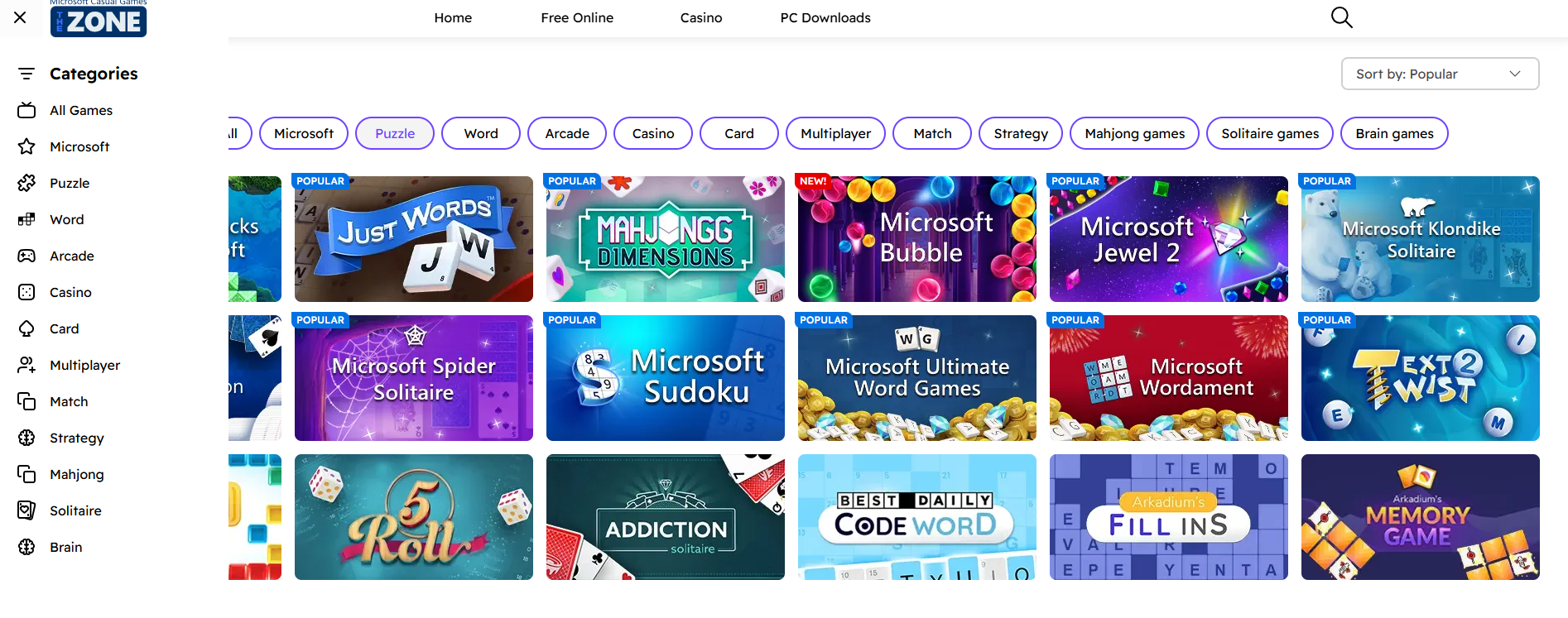
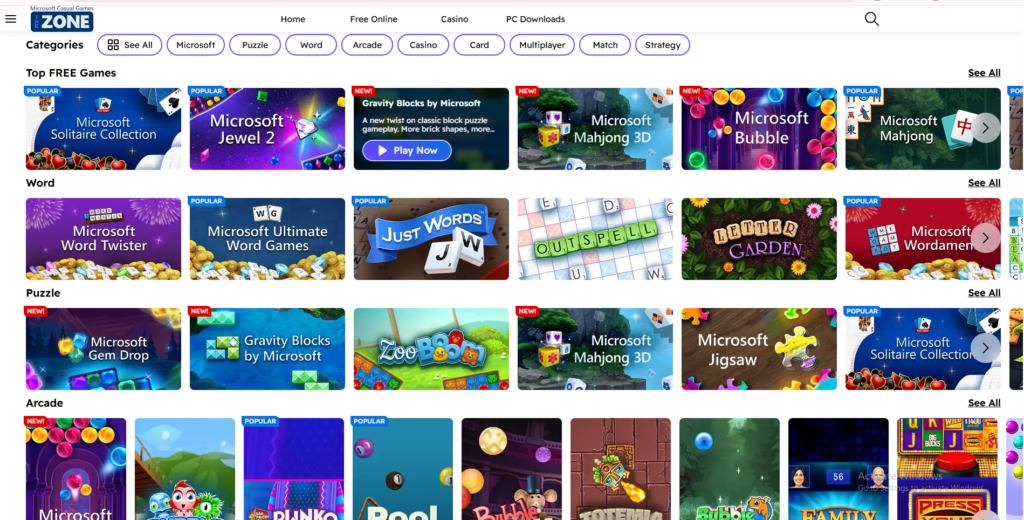
The most noticeable change is the navigation bar. Previously, categories like “Card Games,” “Puzzle,” and “Action” were listed clearly and consistently across the top of the page. In the new layout, some categories are nested under dropdown menus, while others are re-labeled or consolidated in ways that make them harder to find.
New Homepage Structure
The homepage now features larger banners, rotating carousels, and dynamic content blocks highlighting featured games. While visually modern, these changes push older or niche game categories further down the page, making them less visible.
Search Function Modifications
The search bar looked and worked differently before. Users could type a genre or game name and get a long list of filtered results. Now, the search interface feels less intuitive for some, with new auto-suggest features that don’t always match expected results.
Mobile Responsiveness Updates
MSN Games pushed a more responsive mobile design, but some users report that mobile menus are harder to navigate because the compact layout hides category labels behind icons not everyone recognizes.
Why Users Are Confused
Lack of Predictability
When familiar menus disappear or move, users lose “muscle memory.” What used to take one click now takes two, three, or more, breaking the flow.
Ambiguous Labels
Some categories use new labels that aren’t self-explanatory. For example, “Social” may contain games that used to be under “Multiplayer,” leading to uncertainty about what’s inside.
Too Much Visual Noise
Large banners and rotating carousels fill valuable screen real estate, pushing actual game lists below the fold. Users accustomed to seeing game choices immediately now need to scroll more or click through additional menus.
Inconsistent Mobile/Desktop Experiences
Because the redesign prioritizes a modern look, interactions on mobile and desktop don’t always match. Buttons that look clickable on desktop act differently on phones, causing additional confusion.
Real User Feedback
On social media and gamer forums, users have shared comments like:
- “I can’t find my favorite puzzle games anymore!”
- “The homepage feels more like an ad page than a games list.”
- “Clicking the search just doesn’t show what I expect.”
- “Mobile menus hide categories with icons that make no sense.”
These reactions reflect a wider sentiment: that usability took a back seat to aesthetics in the redesign.
How to Navigate the New MSN Games Layout
Here are practical tips for users struggling with the new design:
Use the Search Bar Strategically
Type specific game names rather than genres if category browsing feels confusing. While the search function may auto-suggest, entering the exact title often yields the best result.
Familiarize Yourself With New Labels
Spend a few minutes exploring dropdown menus to learn where items moved. Once you know where “Puzzle,” “Card,” “Action,” or “Multiplayer” live now, navigating becomes faster.
Bookmark Favorite Sections
If you play certain game types often, bookmarking category pages reduces reliance on the navigation menu.
Switch Between Desktop and Mobile
Some users find one version easier to use than the other. If mobile navigation feels confusing, try desktop (or vice versa) to see which experience works best.
Why MSN Games Changed the Layout
While user frustration is understandable, some reasons behind the redesign include:
Modern Aesthetic Trends
The large banners and dynamic content reflect current web design trends aimed at making sites feel fresh and visually engaging.
Better Highlighting of Featured Games
Rotating carousels allow MSN Games to showcase trending or new titles that may otherwise be hidden in older list formats.
Responsive Design for Diverse Devices
The updated layout tries to scale for phones, tablets, and desktops, though the execution has areas for improvement.
Increased Engagement Metrics
Design elements like featured blocks often increase time on site and help drive ad revenue or partner integrations.
Understanding these business motivations helps users see why the redesign happened even if the immediate experience feels confusing.
Common Misconceptions About the Redesign
“They Removed My Favorite Games”
Most games are still on the site—just organized differently. A search or deeper browsing usually finds them.
“The Old Layout Was Broken”
The old layout wasn’t broken for many users. The redesign is more about modernization and shifting priorities than fixing a universally acknowledged problem.
“Navigation Is Impossible Now”
While some reorganization causes confusion, spending time learning the new structure significantly reduces frustration.
FAQ
Can I revert to the old MSN Games layout?
No. MSN Games does not currently offer a layout toggle to reverse design changes.
Why can’t I find some categories easily?
Categories may be nested under broader labels or hidden behind icons in mobile menus.
Is the search function broken?
Not broken—but users need to enter specific game names or experiment with search terms due to auto-suggest behavior.
Did MSN remove games entirely?
Games haven’t been removed just because of layout changes. They may appear in different category paths.
Is the new layout safer or more modern?
The update focuses on modern design and mobile responsiveness more than safety changes.
Will MSN roll back the redesign?
There’s no official indication of a rollback, but user feedback can influence future tweaks.
Conclusion
The MSN Games layout changes in 2026 illustrate a common challenge every long-running site faces: how to modernize while keeping existing users comfortable. While the redesign aims to reflect current web trends and showcase featured content, many users find navigation confusing and less intuitive than before. By understanding what changed, why it changed, and how to adapt through search strategies and menu familiarization, players can regain control of their gaming experience—even if the new layout feels unfamiliar at first. Change can be disorienting, but with a few tips and some exploration, MSN Games is still a valuable and fun platform for casual gamers.
🔥 Related Posts
MSN Games Zone Full List: All Classic Games & Categories
Parent Guide to Times Table Rock Stars: The Complete UK Handbook for Home Success
Terraria Wiki: Full Game Guide with Updates and Downloads
Chess Online 2026: Free Play vs AI Guide
The Ultimate Guide to Family Board Games: Fun, Strategy & Togetherness at Home