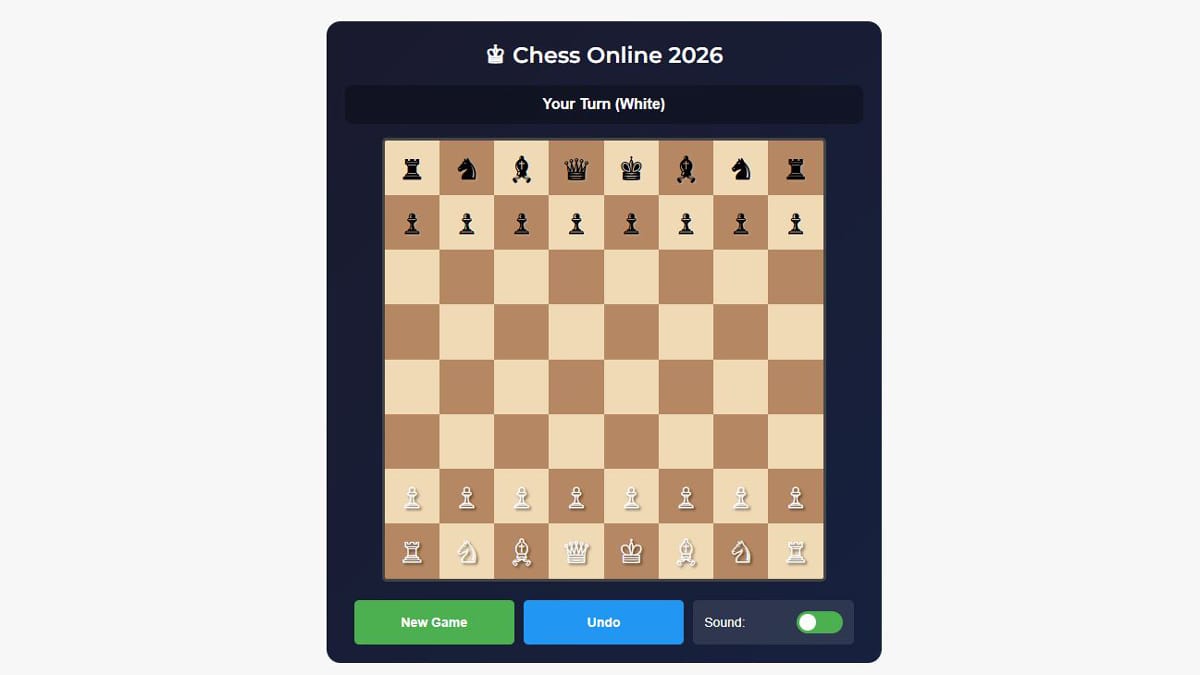
Start your game right now — the interactive chessboard is embedded above! Play as White against a smart AI opponent, make moves using keyboard (arrows/WASD), mouse clicks, or the on-screen mobile controls. The status bar shows whose turn it is, sounds play on every move/capture/check, and you can undo, reset, toggle sound, or start fresh anytime.
In 2026, online chess remains one of the most popular casual + competitive pastimes. Whether you’re a beginner learning the basics, a student taking a quick brain break, or someone who wants to play a proper game without installing anything, this advanced browser-based chess delivers everything: clean wooden-style board, animated piece movement, sound effects, mobile-friendly touch controls, live move feedback, and a surprisingly capable AI opponent.
This guide explains the rules, controls, AI behavior, strategy tips, common mistakes, and why chess is still one of the best mental workouts in 2026.
Why Chess in the Browser Is Still King in 2026
Chess has never been more accessible. You don’t need a $300 board, app subscriptions, or even a strong internet connection (after the page loads, the game runs locally). This version gives you:
- Instant play — no login, no ads interrupting gameplay
- Responsive design — works beautifully on phones, tablets, laptops
- Real-time status — “Your Turn (White)”, “Check!”, “Checkmate!”
- Sound effects — move click, capture slash, win chimes
- Undo button — perfect for learning or casual play
- Mobile D-pad — easy touch controls when keyboard isn’t available
- Local high score tracking (browser storage)
In 2026, chess is booming again thanks to online tournaments, streaming culture, and the timeless appeal of 1v1 strategy. This embedded version captures that magic perfectly.
How to Play: Controls & Interface Guide
The board is right above — here’s how to use every part of it.
Core Rules (Quick Refresh)
- White always moves first
- Goal: Checkmate the opponent’s king (king cannot escape capture)
- Pieces: Pawn (moves forward, captures diagonally), Rook (straight lines), Knight (L-shape), Bishop (diagonals), Queen (any direction), King (one square any direction)
Controls
- Click/tap a piece → green highlights appear on legal moves
- Click/tap a highlighted square to move
- Keyboard — arrows or WASD to select + move (experimental)
- Mobile — use the D-pad buttons (up/left/right/down)
- Undo — last move (great for learning)
- New Game — reset everything
- Sound toggle — mute/unmute move & capture sounds
Game Status Bar
- Shows “Your Turn (White)”, “Bot Thinking…”, “Check!”, “Checkmate! You Win!”, or “Checkmate! You Lose!”
Game Over Screen
- Shows final score, “Play Again” button, dramatic overlay
AI Opponent: How Smart Is It?
The AI is rule-based with priority logic:
- Prefers captures (especially high-value pieces)
- Favors center control
- Tries to advance pawns toward promotion
- Avoids moving into check
- Randomizes slightly among top moves (feels more human)
Difficulty:
- Early game — plays reasonably
- Mid-game — looks for forks, pins, discovered attacks
- Late game — strong endgame knowledge (king + pawn vs king, etc.)
It’s not Stockfish-level, but strong enough to teach beginners and challenge intermediate players. You can win with good tactics and patience.
Winning Strategies & Pro Tips for 2026
- Control the center — Occupy d4, d5, e4, e5 early
- Develop pieces fast — Knights & bishops before queen
- Castle early — Protect your king, connect rooks
- Don’t move the same piece twice in opening (unless forced)
- Look for forks — Knight forks are deadly
- Pawn structure matters — Avoid doubled or isolated pawns
- Endgame rule — King becomes active once queens are off
Common Beginner Mistakes to Avoid
- Moving queen too early
- Ignoring development to grab pawns
- Leaving king in the center
- Trading pieces when behind in development
Troubleshooting & Common Questions
Game not responding? → Click the board first to focus → Refresh page (Ctrl+R)
Mobile controls not working? → Use landscape mode → Tap precisely on buttons
Want to play as Black? → Currently White always starts (standard chess). Refresh after game over to play again.
Sound not playing? → Check browser permissions → Toggle sound switch
Want harder opponent? → The AI is fixed difficulty — practice here, then try lichess.org or chess.com for stronger engines.
Final Thoughts: Chess in 2026 Is Still Pure Magic
Even with VR, AI coaches, and million-dollar tournaments, the simple 8×8 board remains unbeatable for mental clarity and satisfaction. This embedded version gives you that pure experience instantly — no account, no ads, no distractions.
Challenge: Play 3 games above right now.
- Try to win at least one
- Beat your longest game length
- Try to checkmate with only queen + king
Drop your result in the comments — did you win? How many moves? Did the bot get you? ♔
Happy playing! ♟️