If you have been searching for curseforge bedrock, you are probably trying to figure out one simple thing: can you use CurseForge mods with Minecraft Bedrock Edition? This question appears again and again on Bing search, especially from players in the United States who want better shaders, custom maps, add-ons, and mod packs for Windows 10, Xbox, PlayStation, Nintendo Switch, or mobile.
In this complete guide, you will learn what CurseForge Bedrock really means, whether it works with Bedrock Edition, how to safely download add-ons, what alternatives exist, and how to install everything step by step without breaking your game. This is a clear, honest, and detailed explanation made for real players who just want their Minecraft experience to be better.
What Is CurseForge?
CurseForge is one of the largest mod hosting platforms in the world. It is mainly known for hosting thousands of mods for:
- Minecraft Java Edition
- World of Warcraft
- The Sims
- Terraria
- Stardew Valley
- Many other PC games
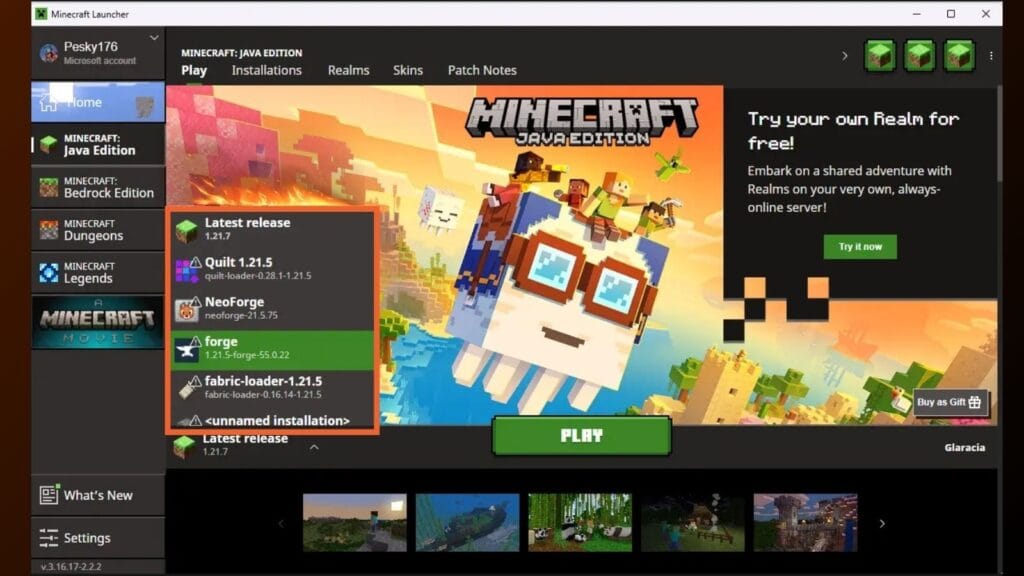
For Minecraft players, CurseForge is the go-to platform for modpacks, performance mods, shaders, and creative expansions. However, most of these mods are made for Minecraft Java Edition, not Bedrock Edition.
What Is Minecraft Bedrock Edition?
Minecraft Bedrock Edition is the version of Minecraft available on:
- Windows 10/11 (Microsoft Store)
- Xbox consoles
- PlayStation consoles
- Nintendo Switch
- Android
- iOS
Unlike Java Edition, Bedrock uses a different engine. That means Java mods from CurseForge do not work directly in Bedrock.
So when people search for curseforge bedrock, they usually mean one of the following:
- Can I install CurseForge mods on Bedrock?
- Does CurseForge support Bedrock Edition?
- Are there Bedrock add-ons on CurseForge?
- How do I mod Minecraft Bedrock safely?
Let’s break this down clearly.
Does CurseForge Work With Bedrock Edition?
CurseForge mainly supports Minecraft Java Edition, not Bedrock.
However, there is more to the story.
CurseForge does host:
- Some Bedrock add-ons
- Maps compatible with Bedrock
- Resource packs in certain cases
But the majority of large modpacks (like SkyFactory, RLCraft, Pixelmon, etc.) are strictly Java Edition only.
This is because:
- Java Edition allows deep code modification.
- Bedrock Edition uses a restricted add-on system.
- Console versions (Xbox, PlayStation, Switch) do not allow traditional mod installations.
So if you are trying to install a modpack through the CurseForge app into Bedrock, it will not work the same way it does in Java.
Bedrock Mods vs Java Mods – What’s the Difference?
Many US players search for “curseforge bedrock mods download,” thinking it works exactly like Java. It does not.
Here is the difference in simple terms:
Java Edition Mods
- Use .jar files
- Installed through mod loaders like Forge or Fabric
- Can completely change game mechanics
- Available in huge quantities on CurseForge
Bedrock Edition Add-Ons
- Use .mcpack or .mcaddon files
- Installed directly into Minecraft
- Limited compared to Java mods
- Focused on behavior packs and resource packs
So when you search for curseforge bedrock, you should understand that Bedrock uses add-ons, not traditional Java mods.
How to Download Add-Ons for Bedrock Safely
If you are playing Bedrock on Windows 10/11, Android, or iOS, you can install add-ons manually.
Step 1: Find Trusted Sources
You can explore:
- Official Minecraft Marketplace (safe but paid)
- CurseForge (limited Bedrock content)
- MCPEDL (popular Bedrock add-on site)
Always avoid suspicious “free mod APK” websites. Many of them contain malware.
Step 2: Download .mcpack or .mcaddon File
After downloading:
- Double-click the file (Windows)
- Or open it using Minecraft (Mobile)
Minecraft will automatically import the pack.
Step 3: Activate the Add-On
Inside Minecraft:
- Go to Create World
- Scroll to Resource Packs or Behavior Packs
- Activate your new add-on
- Create the world
That’s it.
Can You Use CurseForge App for Bedrock?
The CurseForge desktop app is designed mainly for Java Edition.
If you try selecting Minecraft in the app, it will:
- Detect Java Edition
- Install modpacks for Java
- Not integrate directly with Bedrock
So technically, the CurseForge app does not fully support Bedrock mod management like it does for Java.
Best Alternatives for Bedrock Players
If you are a Bedrock player in the USA, here are better options:
1. Minecraft Marketplace
Safe and official, but mostly paid.
2. MCPEDL
Large collection of free Bedrock add-ons.
3. Manual Installation
Download .mcpack files and import manually.
Is It Safe to Download CurseForge Mods?
CurseForge is generally considered safe. It scans uploads for malware and has a strong moderation system.
However:
- Always download from the official CurseForge website.
- Avoid re-uploaded files on random blogs.
- Never install unknown executables claiming to “unlock Bedrock mods.”
If something asks for admin access or looks suspicious, do not install it.
Why Do People Search for CurseForge Bedrock?
Common Bing search queries include:
- curseforge bedrock download
- curseforge bedrock mods
- curseforge bedrock edition
- curseforge bedrock xbox
- curseforge bedrock apk
- how to use curseforge for bedrock
Most of these searches come from players who do not know the difference between Java and Bedrock versions.
The truth is simple:
CurseForge is mostly for Java, not Bedrock.
Can You Mod Bedrock on Xbox or PlayStation?
This is another common question.
On consoles:
- You cannot install external mod files easily.
- Marketplace content is the safest method.
- Some workarounds exist using Realms, but they are complicated.
For console players, the best method is Marketplace content only.
Pros and Cons of Using Add-Ons in Bedrock
Pros
- Easy installation
- No external launcher required
- Works on mobile
- Cross-platform compatible
Cons
- Limited compared to Java
- No large modpacks
- Less customization
- Console restrictions
Frequently Asked Questions (Q&A)
Q1: Can I use CurseForge mods in Bedrock?
No. Java mods from CurseForge do not work in Bedrock Edition.
Q2: Does CurseForge support Bedrock Edition?
Only limited content like maps or certain add-ons, but not full modpacks.
Q3: Is there a CurseForge Bedrock app?
No official Bedrock integration exists like Java Edition support.
Q4: What is the safest way to mod Bedrock?
Use Marketplace or trusted .mcpack add-ons.
Q5: Why do Java mods not work in Bedrock?
Because Java and Bedrock run on different engines and file systems.
Q6: Can I convert Java mods to Bedrock?
Not directly. They require complete redevelopment.
The term curseforge bedrock creates confusion for many players, especially beginners in the United States who want advanced mods without understanding the difference between Minecraft versions.
Here is the clear answer:
- CurseForge = Mainly Java Edition
- Bedrock Edition = Uses add-ons
- Console Bedrock = Very limited modding
If you want the full modding experience with huge modpacks and custom gameplay changes, you need Minecraft Java Edition on PC. If you play Bedrock, you can still enjoy add-ons, resource packs, and Marketplace content — just with some limitations.
Before downloading anything, always check your Minecraft version. That one step can save hours of frustration.
🔥 Related Posts

Clair Obscur: Expedition 33 Gameplay Deep Dive: Reactive Combat & Surreal Wonders (2026)

Word Wipe USA Today – Complete Guide, How to Play, Strategy, Scoring & Tips for U.S. Players
How to Play Scrabble: A Complete Guide for Beginners

Unblocked Games G – The Ultimate Guide to Safe, Free, School-Friendly Online Gaming

Apex Legends Characters: A Complete Guide (2025 Edition)