🎮 Struggling with choppy Minecraft gameplay in 2026? Whether you’re exploring massive builds in 1.21.11 or testing the latest snapshots, Sodium remains the #1 performance mod for US players on modest PCs. This lightweight rendering overhaul skyrockets your FPS, kills micro-stutter, and fixes vanilla graphical glitches—all while keeping that classic blocky look intact.
In this detailed guide, we’ll cover everything: what Sodium does, step-by-step installation, must-have companion mods, best settings tweaks, real-user fixes for crashes, and a quick Sodium vs. OptiFine comparison. Perfect for casual gamers, seniors on older laptops, or anyone tired of lag spikes. Let’s turn your Minecraft into a smooth 300+ FPS machine! 🚀
What Makes Sodium the Best Performance Mod in 2026?
Sodium completely rewrites Minecraft’s rendering engine using modern techniques. It loads chunks faster, reduces GPU/CPU strain, and eliminates stuttering—without changing gameplay or visuals.
Key Benefits:
- Up to 3x FPS boost on low-end hardware
- Smoother exploration and building
- Works on any Fabric server (client-side only—no server install needed)
- Wide mod compatibility (no conflicts with most Fabric packs)
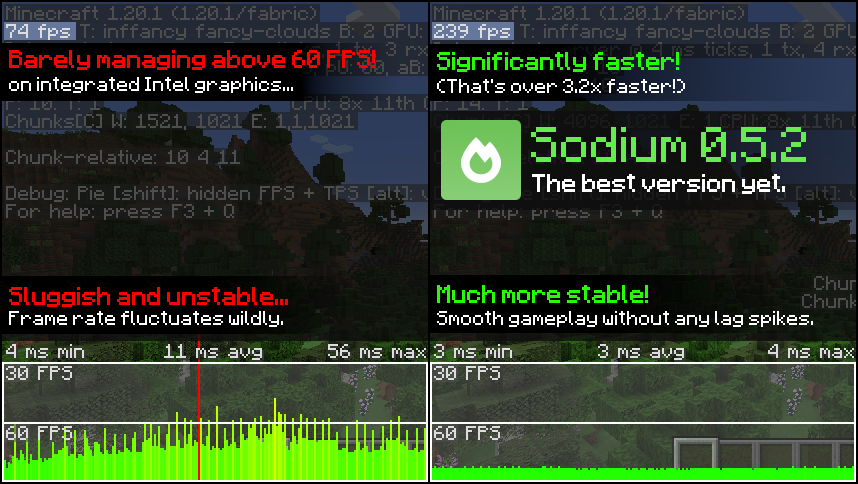
Real-World Gains (from 2026 player reports): Low-end laptops jump from 40-60 FPS → 150-300 FPS Mid-range rigs hit 400-600+ FPS at 12-16 chunks render distance
Here’s a quick before-and-after look:


Step-by-Step: How to Install Sodium on Fabric (2026 Edition)
Sodium works best on Fabric Loader—fast, lightweight, and updated daily for new MC versions like 1.21.11.
Requirements
- Minecraft Java Edition (1.16.5 to 1.21.11 supported)
- Fabric Loader (latest from fabricmc.net)
- Fabric API (required dependency)
- 4GB+ RAM allocated (6-8GB recommended for mods)
Installation Steps (5 Minutes)
- Install Fabric Download the installer from fabricmc.net/use. Run it → Select your MC version (e.g., 1.21.11) → Install. This creates a new “fabric-loader” profile in the Minecraft Launcher.
- Download Sodium & Fabric API Go to modrinth.com/mod/sodium (recommended) or CurseForge. Pick the latest version matching your MC (e.g., for 1.21.11). Also grab Fabric API from the same site.
- Place Files in Mods Folder
- Windows: Press Win+R → type %appdata% → .minecraft → mods (create if missing)
- Drop both Sodium.jar and fabric-api.jar inside
- Launch & Check Open Minecraft Launcher → Select Fabric profile → Play. In-game: Go to Options → Video Settings. You’ll see the fancy new Sodium menu! ✅ Success!
Pro Tip: Use Prism Launcher or CurseForge app for one-click installs—super easy for beginners.
Best Companion Mods: The Ultimate Sodium Performance Pack
Sodium shines brightest when paired with these free mods (all on Modrinth):
| Mod Name | What It Does | FPS Gain | Must-Have? |
|---|---|---|---|
| Lithium | Optimizes game logic, mob AI, ticking | +20-50% | Yes |
| Phosphor | Faster lighting engine | +30-60% | Yes |
| Iris | Adds shader support (stunning visuals) | Varies | For shaders |
| Indium | Enables Fabric Rendering API mods | Needed for some shaders | If using Iris |
| FerriteCore | Reduces RAM usage | +10-20% | Recommended |
| Sodium Extra | Adds OptiFine-style toggles (clouds, particles) | Extra control | Optional |
Recommended Starter Pack:
- Sodium + Lithium + Phosphor + Iris + Indium Install all in one go—expect 200-500% total FPS improvement!

Sodium Settings: Optimize for Max FPS (No Lag!)
Sodium’s default settings are excellent, but tweak these for your setup:
- Render Distance: 12-16 chunks (sweet spot for most PCs)
- Chunk Update Threads: Match your CPU cores (4-8)
- Entity Distance: 75-100% (lower for huge farms)
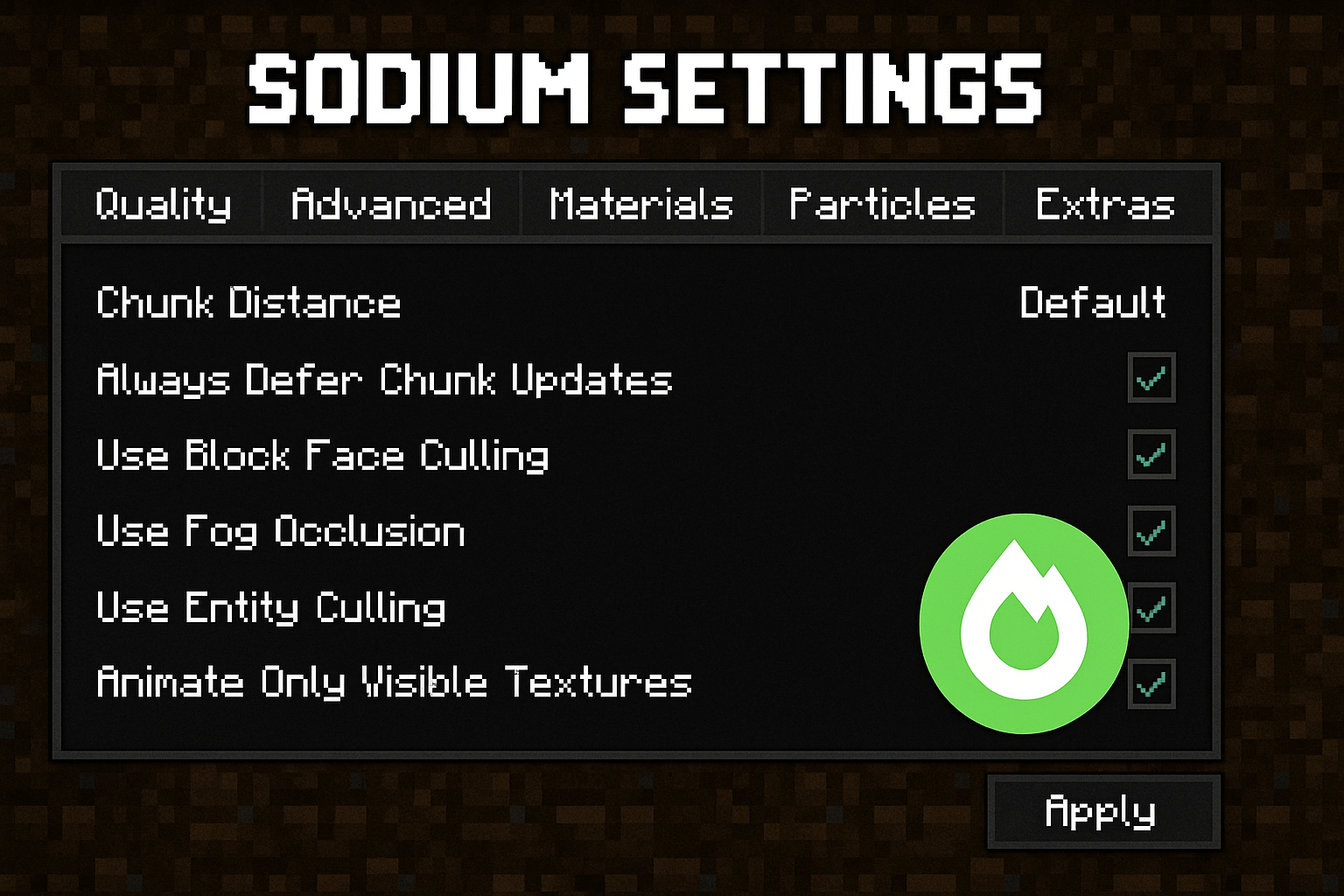
- Always Defer Chunk Updates: On (big FPS win)
- Use Block Face Culling: On
- Advanced Options: Enable “Use Persistent Mapping” if your GPU supports it
For low-end PCs: Turn off V-Sync, set FPS limit to 120-144. For shaders (via Iris): Use “Complementary Reimagined” or “Potato” packs for smooth 100+ FPS.
See the Sodium settings menu in action:

Sodium vs. OptiFine: Quick 2026 Comparison
| Feature | Sodium (with Iris) | OptiFine |
|---|---|---|
| FPS Boost | ⭐⭐⭐⭐⭐ (2-5x higher) | ⭐⭐⭐⭐ Good but lower |
| Update Speed | ⭐⭐⭐⭐⭐ Daily for new MC | ⭐⭐⭐ Slower releases |
| Shader Support | Iris (better performance) | Built-in (more features) |
| RAM Usage | 20-40% less | Higher |
| Mod Compatibility | Excellent (Fabric ecosystem) | Forge-focused |
| Best For | Pure speed & modern MC | All-in-one features |
Winner for 2026: Sodium + Iris wins for raw performance and faster updates. OptiFine is great if you want one-file simplicity.
Troubleshooting: Fix Common Sodium Issues Fast
From real player forums—here’s how to solve 90% of problems:
- Crash on Launch ✅ Wrong version? Redownload Sodium + Fabric API for your exact MC version. Delete mods folder and add one-by-one.
- No FPS Boost ✅ Check if Sodium loaded (Video Settings shows new menu). Update GPU drivers! Disable other rendering mods.
- Shader Crashes ✅ Install Indium + Iris correctly. Test without shaders first.
- Black Screen / Artifacts ✅ Update Java to latest (21+). Lower render distance temporarily.
- Mods Not Working ✅ Ensure all are Fabric versions—not NeoForge.
Quick Fix Table:
| Problem | Solution |
|---|---|
| Exit Code 1 | Wrong mod version—match MC exactly |
| No Sodium Menu | Missing Fabric API |
| Low FPS Still | Update graphics drivers + test vanilla first |
| Shader Lag | Use lighter packs + enable Indium |
One user shared: “Went from 45 FPS to 280 after fixing drivers—game changer!” You’re not alone; these tweaks work for thousands.
Ready to Dominate Minecraft in 2026?
Sodium is the easiest way to make Minecraft feel brand new—smoother, prettier, and lag-free. Start with the basic pack (Sodium + Lithium + Phosphor), then add Iris for shaders. Your worlds will load faster, exploration will feel fluid, and you’ll finally enjoy high render distances without melting your PC.
Got a favorite shader pack or still hitting a snag? Drop it in the comments—we test everything! Happy mining, friends! 🟩🔥
🔥 Related Posts

Paper.io – Full Guide, Gameplay Tips, Strategies & Everything You Must Know (2025 Updated)
Understanding Valorant Ranks: A Complete Guide for Competitive Players

CurseForge Bedrock – Complete Guide for Minecraft Bedrock Players (2026)

Unblocked Games G – The Ultimate Guide to Safe, Free, School-Friendly Online Gaming

Word Wipe USA Today – Complete Guide, How to Play, Strategy, Scoring & Tips for U.S. Players