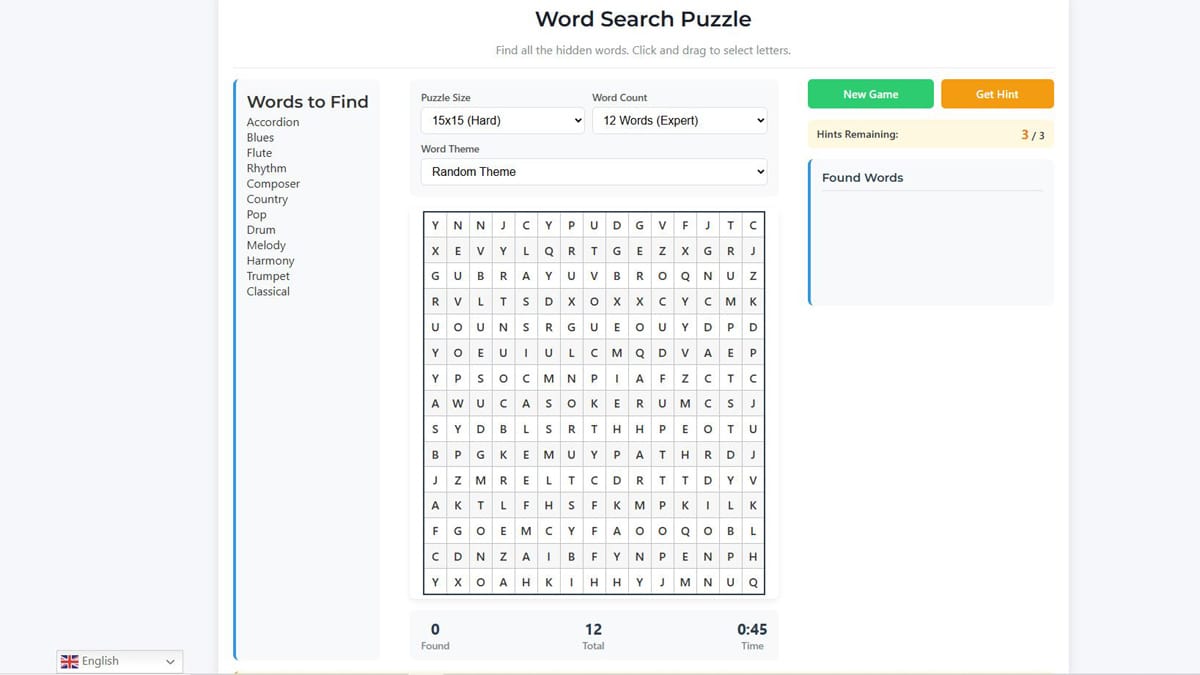
Start hunting words right away — the interactive word search puzzle is embedded above! Choose your grid size (10×10 Easy → 18×18 Expert), word count (6–12), theme (Technology, Animals, Countries, Food, Science, Sports, Movies, Nature, Music or Custom), and hit New Game. Click and drag to highlight words (forward, backward, vertical, horizontal, diagonal) — found words auto-strike through, timer counts up, hints help when stuck (3 per game), and stats track your progress. In 2026 this classic brain game is still the perfect quick mental workout, school-safe on Chromebooks, and endlessly replayable with fresh themes and custom lists.
Why Word Search Puzzles Are Still Addictive in 2026
Word search has been a newspaper staple for decades, but the browser version in 2026 brings modern polish: responsive grids, mobile touch-drag, themed word packs, hint system, and live stats (found/total words + timer). It’s perfect for short breaks, vocabulary building, or relaxing without high-stakes pressure.
Key Benefits:
- Sharpens pattern recognition & spelling
- Zero learning curve — just drag to select
- Custom mode lets you input your own words (great for themed study or party games)
- Fully accessible: works offline after load, no account needed
How to Play the Embedded Puzzle (Quick Guide)
- Customize → Pick size, word count, theme (or type custom words)
- New Game → Grid generates instantly
- Find Words → Click + drag over letters (any direction)
- Found words strike through in word list & highlight green in grid
- Stuck? → Use Hint button (reveals one letter, 3 total)
- Win → Find all words — timer stops, message celebrates
Mobile Tip: Use two fingers to scroll if grid overflows; touch-drag works perfectly.
Difficulty & Theme Guide (2026 Edition)
| Size | Words | Time Range | Best For |
|---|
| 10×10 | 6–8 | 3–8 min | Beginners, quick play |
| 12×12 | 8–10 | 8–15 min | Standard daily challenge |
| 15×15 | 10–12 | 15–30 min | Intermediate solvers |
| 18×18 | 12 | 25–50 min | Expert & marathon players |
Popular Themes (2026):
- Technology (JavaScript, Python, Blockchain…)
- Animals (Elephant, Octopus, Chameleon…)
- Countries (Australia, Bangladesh, Madagascar…)
- Food (Zucchini, Guacamole, Risotto…)
- Science (Photosynthesis, Tectonics, Molecule…)
- Sports (Basketball, Surfing, Marathon…)
- Movies/TV (Animation, Blockbuster, Streaming…)
- Nature (Waterfall, Rainforest, Sequoia…)
- Music (Symphony, Guitar, Reggae…)
Custom Mode: Type comma-separated words → perfect for revision lists or themed parties.
Pro Tips to Solve Faster & Score Higher
- Start with longest words — they’re easiest to spot
- Scan horizontally/vertically first, then diagonals
- Use backward words — many hide in reverse
- When stuck → Hint reveals one letter (strategic use only!)
- Time yourself — sub-10 min on 12×12 = strong player
2026 Challenge: Try Expert 18×18 with 12 words — beat 30 minutes?
Quick Fixes for Common Glitches
- Grid won’t load? → Hard refresh (Ctrl+Shift+R)
- Mobile drag issues? → Use desktop site mode
- Hint not working? → Refresh + New Game
- Words missing? → Check custom list (no spaces after commas)
School/Work Safe: Embedded version usually bypasses basic filters.
Why Word Search Still Wins in 2026
It’s simple, relaxing, educational, and endlessly replayable — no complex rules, no pressure, just satisfying “found it!” moments. Whether you’re building vocabulary, relaxing, or competing with friends, this version delivers the classic experience with modern polish.
Your turn — solve the puzzle above right now! How many words did you find? Fastest time? Drop it in the comments — let’s see who’s the word-search champion!