Palworld has changed a lot since its explosive Early Access launch in 2024.
The game officially reached version 1.0 in July 2026, bringing new regions, new Pals, a reworked story, the long-awaited World Tree, new progression systems, and major changes to breeding, exploration, bases, and multiplayer.
That makes an up-to-date Palworld wiki much more useful than it was when the game first appeared.
Maybe you are trying to find a particular Pal, locate a dungeon on the Palworld map, plan a breeding chain with a Palworld breeding calculator, figure out whether a mod still works with 1.0, or simply find the safest place for a Palworld download.
This guide covers those practical questions without turning into a giant encyclopedia.
For official news and game information, start with the official Palworld page from Pocketpair.
What Is the Best Palworld Wiki?
One of the most useful community references is the Palworld Wiki hosted on wiki.gg.
It includes information about Pals, technology, bases, raids, weapons, materials, bosses, dungeons, factions, patches, and the Palpagos Islands.
The community wiki currently tracks the post-1.0 game and lists version 1.0.5 as the current patch as of September 14, 2026.
That is important because older Palworld pages can now be badly outdated.
Version 1.0 changed Pal habitats, progression, breeding combinations, partner skills, the level cap, and large parts of the world. A breeding guide or map created during early 2024 may still contain useful basics while being wrong about many current details.
Which Resource Should You Use?
| What You Need | Useful Resource |
|---|---|
| Game news and official updates | Pocketpair |
| Pals, items, bosses and mechanics | Palworld Wiki on wiki.gg |
| Interactive world map | Palworld GG |
| Breeding combinations | Palworld GG breeding calculator |
| PC mods | Steam Workshop / Nexus Mods |
| Official PC download | Steam |
| Server configuration | Official Palworld server documentation |
The best approach is not to depend on one website for everything.
Use official Pocketpair sources for announcements and patch information, then use community databases when you need deeper location, Pal, or breeding data.
Palworld 1.0 Changed the Game Significantly
Players returning after a long break should not assume the world works exactly as it did during Early Access.
Version 1.0 introduced Sunreach, a group of floating islands with its own civilization, Pals, resources and tower challenges. It also finally opened the World Tree, which became a major part of the game’s story and endgame progression.
The update also added smaller islands, redesigned wildlife sanctuaries, new settlements and additional ancient ruins.
Watchtowers became especially useful for exploration because activating one reveals the surrounding portion of the map and turns the tower into a fast-travel location.
For returning players, exploring again instead of relying entirely on memory is a good idea.
Understanding the Palworld Map
The Palworld map is much larger and more layered than the original launch version.
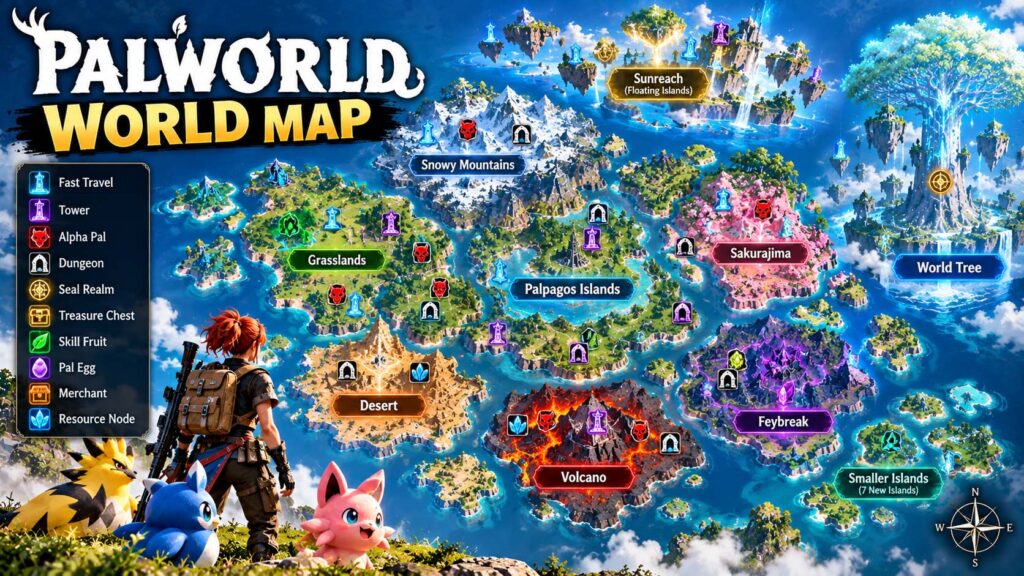
Palpagos now contains very different environments, ranging from starting grasslands and tropical areas to volcanic zones, deserts, snowy mountains, Sakurajima, Feybreak, floating islands and late-game regions.
Version 1.0 also expanded exploration with Sunreach, the World Tree and seven additional smaller islands spread across different biomes.
An interactive map becomes particularly useful once you start hunting for specific resources rather than simply exploring.
What Can an Interactive Map Help You Find?
The Palworld GG interactive map currently provides filters for locations and resources including:
- Fast-travel points
- Tower locations
- Alpha Pals
- Dungeons
- Sealed Realms
- Treasure chests
- Skill Fruits
- Pal Effigies
- Eggs
- NPCs and merchants
- Ore, coal and sulfur
- Pure Quartz
- Paldium
- Crude Oil
It also supports both Palpagos and World Tree map views.
You can explore it through Palworld GG’s interactive map.
When Should You Use an Interactive Map?
For a first playthrough, I would not open every filter immediately.
Palworld rewards wandering around.
Finding an unexpected Alpha Pal, dungeon entrance or unusual island feels much more memorable when you did not know it was waiting around the corner.
Interactive maps become more valuable later when you have a specific goal.
For example, they are excellent when you need one last fast-travel point, want to plan an ore base, are searching for a particular Alpha Pal, or need to find multiple resource nodes efficiently.
Use the map as a tool rather than turning the entire world into a checklist.
Palworld GG: What Is It?
Players searching for “Palworld GG” are usually referring to Palworld.gg, a third-party database and tools site.
It is separate from Pocketpair and separate from the community wiki on wiki.gg.
The similarity in names can be confusing.
Palworld GG is especially useful because it combines several practical tools, including an interactive map and breeding calculator.
| Site | Main Purpose |
|---|---|
| Pocketpair | Official game information |
| Palworld Wiki / wiki.gg | Community encyclopedia |
| Palworld.gg | Maps, calculators and gameplay tools |
For players actively building teams or planning breeding routes, Palworld GG can sometimes be faster than reading multiple wiki pages.
How the Palworld Breeding Calculator Helps
Breeding becomes complicated surprisingly quickly.
Choose two Pals, give them the required setup and food, and their offspring follows Palworld’s breeding system. But once you are trying to produce a specific Pal while also transferring desirable passive skills and strong stats, guessing combinations becomes inefficient.
A Palworld breeding calculator does the math for you.
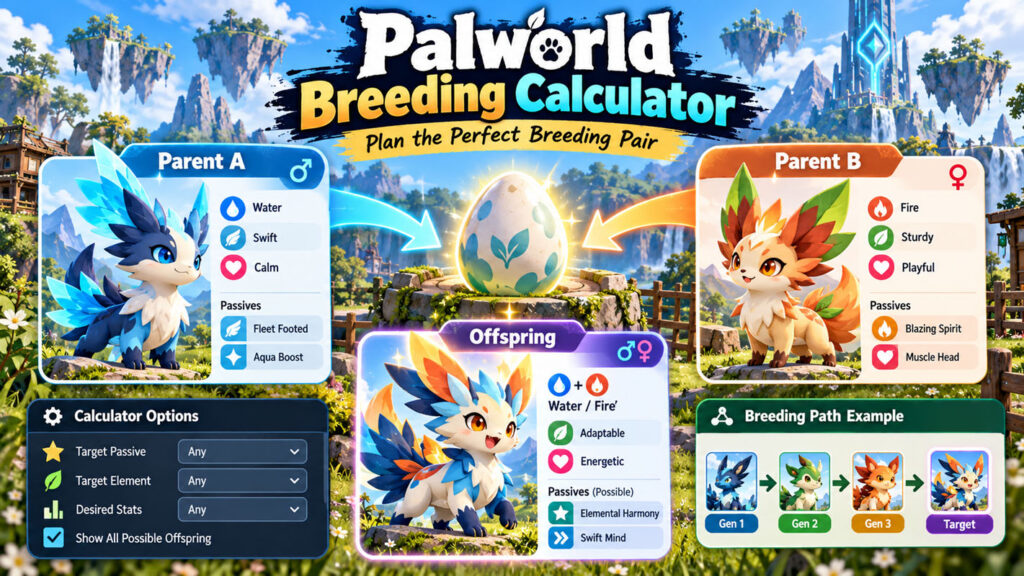
Palworld GG lets you select two parent Pals to see the resulting offspring. It can also work backwards: choose the Pal you want and see possible parent combinations. Its current calculator also includes tools for finding breeding paths.
Use the Palworld GG Breeding Calculator when you have a specific target rather than randomly pairing Pals.
Breeding Changed in Palworld 1.0
This is another area where older guides can cause problems.
Version 1.0 reviewed Pal breeding combinations across the game and added a new Mutation mechanic.
Breeding now has a chance to produce a mutated Pal with stronger-than-normal stats and a unique passive skill. New types of cake can also influence breeding outcomes, including cakes designed to improve stats, produce multiple eggs, increase mutation chances or improve passive-skill inheritance.
That makes breeding calculators more useful, but they cannot replace every part of breeding strategy.
A calculator can tell you which parents produce a target Pal.
It cannot guarantee that you will get the exact passive skills, mutation or stat combination you want on the first egg.
A Better Way to Approach Breeding
Start with the Pal you actually want rather than asking, “What will these two random Pals produce?”
Use a breeding calculator to identify realistic parent combinations.
Then look at the Pals you already own and choose a breeding chain that lets you pass down useful passive skills.
This becomes especially helpful when building specialized Pals for combat, mounts or base work.
Do not breed only because a tier list says a Pal is powerful. A perfectly bred worker with excellent base traits may save you more time than another combat Pal you rarely use.
Also Read: Marvel Rivals Guide 2026: Characters, Tracker, Mods and Beginner Tips
What About Palworld Mods?
The Palworld mods scene is still very active after the 1.0 release.
On PC, mods range from simple visual adjustments to major gameplay modifications.
Nexus Mods currently lists thousands of Palworld files across categories such as gameplay, Pals, visuals, user interface, utilities, characters and weapons.
The Steam version also currently includes Steam Workshop support directly on its store page.
That makes mod discovery easier than it was during Palworld’s early days.

Common Types of Palworld Mods
You will find mods that alter things such as:
- Graphics and visual effects
- UI elements
- Base-building limits
- Work behavior
- Experience rates
- Pal appearance
- Character outfits
- Weapons
- Fast travel
- Inventory and weight
- Pal statistics
- Gameplay difficulty
Some of these are simple quality-of-life changes. Others dramatically change progression.
Be Careful After Game Updates
A Palworld mod that worked with an older Early Access build may not work correctly with version 1.0.
The July 2026 release made large changes to the world, Pals, balance systems and game data. Mod authors have had to update many projects specifically for the new release.
Before installing a mod, check:
- Its most recent update date.
- Whether it explicitly supports Palworld 1.0.
- Required dependencies.
- Installation instructions.
- Known bugs.
- Whether it is meant for single-player or multiplayer.
Always back up important saves before experimenting with major gameplay modifications.
For current community files, Palworld Mods on Nexus Mods is one established source.
Palworld Download: Where Should You Get the Game?
If you searched for a Palworld download, use an official storefront.
Do not download random “Palworld installers,” cracked launchers or APK files from unfamiliar download sites.
Pocketpair’s current product page lists Palworld on Steam, PlayStation 5, Xbox Series X|S, Xbox One and the App Store.
For Windows PC, Steam is one of the simplest official options.
The Steam version supports single-player, online co-op, cross-platform multiplayer, Steam Workshop, Steam Cloud and controller support. It is also currently marked Steam Deck Verified.
You can access the official PC listing through Palworld on Steam.
Palworld PC Requirements
Steam currently lists these basic requirements for Windows:
| Component | Minimum |
|---|---|
| OS | Windows 10 64-bit |
| CPU | Intel Core i5-9400F |
| RAM | 16 GB |
| GPU | GeForce GTX 1660 |
| Storage | 40 GB |
| DirectX | Version 11 |
| Drive | SSD required |
The recommended specification increases memory to 32 GB and suggests hardware around an Intel Core i5-12400 or Ryzen 5 5600X with an RTX 3060 Ti or Radeon RX 6700 XT.
Always check the store page again before downloading because system requirements can change.
Is Palworld Still in Early Access?
No.
This is one of the biggest pieces of outdated information still appearing in older guides.
Palworld originally entered Early Access in January 2024, but Pocketpair officially launched Palworld 1.0 in July 2026.
The game has continued receiving updates since full release.
Version 1.0.4 added new missions and balance changes in September, while version 1.0.5 followed with additional bug fixes.
If a wiki page still describes Palworld as an Early Access game, check when it was last updated.
Palworld Wiki vs. Palworld GG
Both can be useful, but they solve different problems.
Use the Palworld wiki when you want to understand something.
Use Palworld GG when you want to calculate or locate something quickly.
For example:
| Task | Better Choice |
|---|---|
| Learn what a Pal’s Partner Skill does | Wiki |
| Find where an Alpha Pal spawns | Palworld GG map |
| Read about a boss | Wiki |
| Plan a breeding combination | Palworld GG calculator |
| Research materials | Wiki |
| Locate resource nodes | Interactive map |
| Check patch history | Wiki / official announcements |
Keeping both bookmarked is more useful than trying to make one site handle every question.
Tips for Using a Palworld Wiki Without Spoiling Everything
Palworld is an exploration game, so do not feel obligated to optimize every minute.
A few simple habits make outside guides more useful:
- Search for a specific problem instead of reading entire walkthroughs.
- Use the interactive map when you need one resource or Pal.
- Check dates on breeding guides.
- Verify that mod pages mention version 1.0 compatibility.
- Use official sources for important patch changes.
- Back up save data before installing major mods.
- Avoid unofficial game-download sites.
- Explore new areas naturally before revealing every marker.
The best Palworld guide is the one that helps when you are stuck and then gets out of your way.
Palworld Wiki FAQ
Is there a good Palworld wiki?
Yes. The community-maintained Palworld Wiki on wiki.gg covers Pals, items, bases, technology, bosses, dungeons, updates and many other systems. It is actively tracking the full-release version of the game.
What is Palworld GG?
Palworld.gg is a third-party tools site. It includes resources such as an interactive Palworld map and breeding calculator.
What is the best Palworld breeding calculator?
Palworld GG provides a useful calculator that can show the offspring from two parents, find parent combinations for a target Pal and help plan breeding paths.
Has Palworld officially released?
Yes. Palworld version 1.0 officially launched in July 2026 after more than two years in Early Access.
What is the current Palworld version?
The latest official Steam patch visible as of October 15, 2026 is v1.0.5, released September 14. It fixed texture-resolution and map-filter issues.
Where should I download Palworld?
Use official stores linked by Pocketpair. On PC, Steam is an official option. Avoid unofficial installers, repacks or unknown download sites.
Can you use Palworld mods?
PC has an active modding community, and the Steam version currently supports Steam Workshop. Third-party mods can still break after updates, so check compatibility and back up important saves.
Did breeding change in Palworld 1.0?
Yes. Breeding combinations were reviewed, and version 1.0 introduced Mutation and additional cake effects that can influence breeding results.
Final Thoughts
A good Palworld wiki becomes more valuable as your goals become more specific.
Early in the game, you probably do not need to know every Pal location or breeding combination. Explore, build a base, catch whatever looks interesting and learn how the systems work naturally.
Later, outside tools save a huge amount of time.
Use the Palworld map when you are tracking down resources or missing locations. Use a Palworld breeding calculator when you want a particular offspring or breeding chain. Use Palworld GG when you need quick map and calculator tools. Experiment with Palworld mods carefully on PC, and always check whether they have been updated for the current version.
And when looking for a Palworld download, stick to Pocketpair’s official platform links and established stores rather than random download sites.
Palworld is no longer the Early Access game many older guides describe. Version 1.0 expanded the world substantially, reworked major systems and finally opened the path to the World Tree, so checking the date on any wiki, map, breeding guide or mod page is now more important than ever.
🔥 Related Posts

The Ultimate Guide to Friday Night Funkin Mods: New Songs, New Battles, New Worlds

Fortnite Download: Your Complete Guide to Installing Fortnite on Any Device

Minecraft Skin Editor — The Complete Guide to Designing, Editing & Using Skins

Shell Shockers Unblocked – Play the Ultimate Egg Shooter Game Anywhere (Complete 2025 Guide)

Best Call of Duty Games Ranked for New Players in 2026