Video game music composition is different from writing a song, scoring a film, or producing a trailer cue. In a film, the composer knows exactly what will happen at minute 12, second 43. In a game, the player may run into battle, pause to explore, die, restart, open a menu, or spend twenty minutes staring at a locked door. The music has to survive all of that without feeling broken.
That is what makes video game music so interesting. It is emotional, technical, flexible, and often invisible when it is doing its job well. A great game score can make a boss fight feel dangerous, a quiet village feel safe, or a puzzle room feel strange before the player even understands why. It can also react to gameplay in real time, changing its layers, intensity, tempo, or arrangement as the player moves through the world.
For composers, game developers, content writers, and anyone studying game audio, understanding video game music composition means understanding both music and systems. A game soundtrack is not only a collection of tracks. It is a living part of the game design.
This guide explains how video game music composition works, what skills a game music composer needs, how adaptive music is built, what tools are commonly used, and how a soundtrack moves from the first idea to the final in-game mix.
What Is Video Game Music Composition?
Video game music composition is the process of creating music specifically for interactive games. It includes writing melodies, harmonies, rhythms, textures, loops, stingers, transitions, menu music, battle themes, ambient layers, and adaptive systems that respond to player behavior.
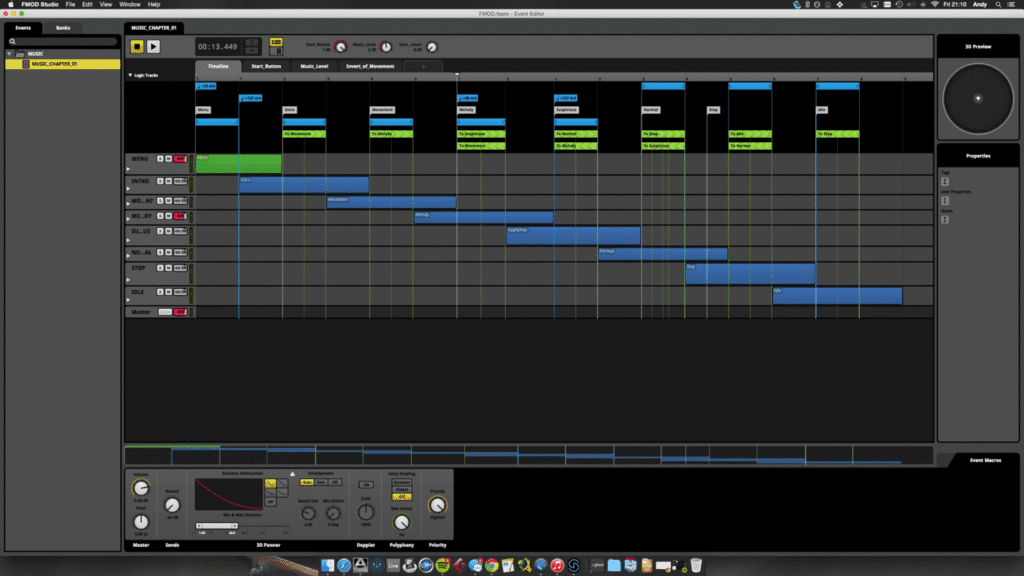
A traditional soundtrack may play from beginning to end. Game music usually cannot be that simple. It must support scenes that change length, repeat naturally, react to player choices, and fit technical limits set by the game engine.
A video game composer may write:
| Music Type | Purpose in the Game | Common Example |
|---|---|---|
| Main theme | Gives the game a musical identity | Title screen or opening sequence |
| Exploration music | Supports movement and discovery | Open-world travel, villages, dungeons |
| Combat music | Raises tension and energy | Enemy encounter or boss fight |
| Menu music | Keeps the player engaged outside gameplay | Main menu, inventory, character screen |
| Cutscene music | Scores fixed story moments | Cinematic scenes |
| Stingers | Short musical reactions | Quest complete, item found, player death |
| Adaptive layers | Music that changes with gameplay | Stealth to combat transition |
| Ambient music | Creates atmosphere without strong melody | Horror, sci-fi, survival, puzzle games |
The best game music does not fight for attention every second. Sometimes it leads. Sometimes it hides. Sometimes it works almost like lighting: shaping the mood without announcing itself.
Why Video Game Music Matters
Players remember games for many reasons: mechanics, characters, art direction, story, challenge, and world design. Music connects those pieces emotionally. A melody can turn a level into a memory. A sound palette can make a world feel old, futuristic, lonely, magical, or dangerous.
Music in games usually has four major jobs.
First, it sets the emotional tone. A peaceful piano theme tells the player they are safe. Low strings and distant percussion suggest threat. Bright synths can make a racing game feel fast before the car even moves.
Second, it supports gameplay. Combat music tells players that the situation has changed. A rising layer can warn that enemies are nearby. A soft musical cue can reward progress without interrupting control.
Third, it gives identity to characters, places, and factions. A strong theme can make a villain recognizable before they appear on screen. A regional sound can make one area feel culturally different from another.
Fourth, it improves immersion. When music reacts naturally to the player, the game world feels more alive. The player may not consciously notice every transition, but they feel the difference.
Good video game music is not decoration. It is part of the user experience.
Video Game Music Composition vs. Film Scoring
Film music and game music share many skills. Both use melody, harmony, orchestration, pacing, texture, and emotional timing. The difference is structure.
Film is linear. Games are interactive.
In a film, the composer writes to a locked picture. In a game, the composer writes for possible situations. The player controls the timing, so the music has to be designed in flexible pieces.
| Film Scoring | Game Music Composition |
| Fixed timeline | Flexible timeline |
| Composer scores exact scenes | Composer scores systems and gameplay states |
| Music follows the edit | Music follows player behavior |
| Transitions happen at known moments | Transitions may happen at any time |
| Final mix is mostly fixed | Mix may change in real time |
| Music can build to a precise frame | Music must loop, branch, or layer smoothly |
This is why a game composer needs more than musical taste. They must think like a designer. They need to ask practical questions: What happens if the player stays here for ten minutes? What happens if combat starts halfway through the loop? What if the player opens the map during a tense moment? Should the music stop, fade, filter, or keep playing?
In game audio, the wrong transition can break immersion faster than a weak melody.
The Main Building Blocks of Game Music
Most game soundtracks are built from a mix of linear tracks and interactive elements. Even simple indie games often need more than one full-length track per area.
1. Loops
Loops are repeating pieces of music designed to play seamlessly. A loop may be eight seconds long, two minutes long, or somewhere in between. The goal is to make repetition feel natural.
A poor loop becomes annoying quickly. A strong loop has enough movement to stay interesting but not so much that it becomes distracting. Ambient loops often use subtle changes in texture. Combat loops may use rhythmic energy and strong motifs.
2. Stingers
A stinger is a short musical cue triggered by an event. It may play when the player finds treasure, fails a mission, wins a round, unlocks an achievement, or enters danger.
Stingers are useful because they create instant feedback. They are small, but they can make an action feel more satisfying.
3. Themes and Motifs
A theme is a recognizable musical idea. A motif is usually shorter: a few notes, a rhythm, or a harmonic shape. Game composers use themes and motifs to connect the player emotionally to characters, locations, and story arcs.
A main character might have a theme that appears in different forms: soft piano during a sad scene, full orchestra during a victory, distorted synth during a nightmare sequence.
4. Layers
Layering is one of the most important techniques in adaptive game music. A composer creates separate stems that can be added or removed depending on gameplay.
For example:
| Gameplay State | Music Layers Playing |
| Exploration | Pads + light percussion |
| Suspicion | Pads + light percussion + low pulse |
| Combat | Pads + full percussion + bass + brass |
| Boss phase | Full percussion + bass + brass + choir |
The player hears one continuous piece of music, but the system is changing the arrangement underneath.
5. Transitions
Transitions connect one musical state to another. They can be subtle fades, rhythmic cuts, cymbal swells, risers, drum fills, reversed sounds, or composed bridge sections.
Transitions matter because games are unpredictable. A player can enter combat at a strange moment. The music system must move from one state to another without sounding like two unrelated tracks crashed into each other.
Adaptive Music and Interactive Music Explained
Adaptive music, also called interactive music, changes in response to gameplay. It may respond to player health, enemy distance, location, time pressure, stealth status, weather, story progress, or combat intensity.
This is one of the key differences between video game music composition and other forms of scoring. The composer is not only writing music. They are writing music that can change shape.
There are two common approaches: vertical layering and horizontal resequencing.
Vertical Layering
Vertical layering means adding or removing musical layers while the same timeline continues. Imagine a track with separate stems for drums, bass, strings, synth pads, and choir. The game can bring those stems in or out depending on what is happening.
This works well for combat intensity, stealth systems, racing games, survival games, and open-world exploration.
| Situation | Possible Layer Change |
| Player is safe | Ambient pad only |
| Enemy is nearby | Add pulse layer |
| Enemy attacks | Add drums and bass |
| Player health is low | Add high strings or distorted texture |
| Boss enters final phase | Add choir or lead melody |
Vertical layering feels smooth because the music does not need to restart. It simply grows or shrinks.
Horizontal Resequencing
Horizontal resequencing means moving between different musical sections. The game might jump from exploration music to combat music, then to victory music, then back to exploration.
This method works well when gameplay has clear states. It is often used in adventure games, RPGs, boss fights, platformers, and story-driven games.
The challenge is timing. The transition should usually happen at a musical point that makes sense, such as the end of a bar or phrase. Otherwise, the switch can feel rough.
Which Method Is Better?
Neither method is automatically better. Many games use both. A game may use horizontal resequencing to move between exploration and combat, then vertical layering inside the combat track to increase intensity.
The best choice depends on the game’s design.
| Game Type | Music Approach That Often Works Well |
| Horror | Sparse layers, drones, stingers, silence |
| RPG | Themes, location music, battle transitions |
| Racing | Looping high-energy tracks, intensity layers |
| Puzzle | Minimal loops, soft progression, subtle variations |
| Open-world | Long ambient beds, regional themes, adaptive layers |
| Roguelike | Modular loops, variation systems, combat stingers |
| Boss fight | Phase-based music, transitions, escalating layers |
A strong composer thinks about the player’s experience first. The technique comes second.
The Video Game Music Composition Process
Every project is different, but most game music follows a similar creative path. The process usually begins long before the final version of the game is ready.
Step 1: Understand the Game
Before writing music, the composer needs to understand the game’s identity. This includes genre, art style, story, pacing, target audience, platform, gameplay loop, emotional tone, and technical needs.
A composer should ask questions like:
• What should the player feel in this area?
• Is the game serious, funny, dark, nostalgic, cozy, violent, strange, or cinematic?
• How long will the player usually stay in each area?
• Does the music need to react to combat, health, weather, time, or dialogue?
• Are there cultural, historical, or genre references to consider?
• Will the game use live instruments, synths, chiptune, orchestra, hybrid scoring, or sound design textures?
This stage saves time later. Many weak game scores fail because the music sounds good by itself but does not understand the game.
Step 2: Build a Music Style Guide
A music style guide helps keep the soundtrack consistent. It may include reference tracks, instrument choices, tempo ranges, emotional keywords, forbidden sounds, theme notes, and mixing direction.
For example, a cozy farming game might use acoustic guitar, soft piano, hand percussion, clarinet, and warm room reverb. A cyberpunk shooter might use distorted synth bass, industrial percussion, processed vocals, and aggressive sidechain movement.
A style guide is especially useful when multiple composers or sound designers work on the same game.
Step 3: Write the Main Theme
Not every game needs a big main theme, but many benefit from a memorable musical identity. The main theme can be used in the title screen, trailer, ending, emotional scenes, or subtle variations throughout the soundtrack.
A good game theme is flexible. It should work in different tempos, keys, instruments, and moods. If the main theme only works in one arrangement, it may be less useful across a full game.
Step 4: Create Gameplay Music
Once the direction is clear, the composer writes music for actual gameplay. This is where the real design work begins.
Gameplay music must consider repetition. A track that sounds exciting once may become exhausting after thirty loops. A track that sounds beautiful in isolation may cover important sound effects. A dense arrangement may clash with dialogue or UI sounds.
The composer has to leave space. Space is not weakness. In game music, space often makes the mix stronger.
Step 5: Prepare Stems and Loops
After composition, the music is usually exported into stems. Stems are separated audio files, such as drums, bass, melody, harmony, and ambience. These stems allow the game engine or audio middleware to control the arrangement.
Clean looping is essential. The loop must not click, jump, drag, or create an obvious reset point. Reverb tails, delay trails, and rhythmic pickups need careful handling.
Step 6: Implement the Music
Implementation means placing the music into the game and connecting it to gameplay logic. This may happen in the game engine or through audio middleware.
A composer who understands implementation has a major advantage. They can write music that works in the actual game, not only in a DAW session.
Step 7: Test in Gameplay
Testing is where many problems appear. The music may be too loud, too repetitive, too busy, too slow to transition, or too emotionally strong for normal gameplay.
A track that felt perfect in the studio may feel wrong after ten minutes of play. That is normal. Game music should be judged inside the game.
Step 8: Revise and Mix
The final stage includes editing, balancing, mastering, naming files correctly, checking loops, testing transitions, and making sure the score fits the game’s technical requirements.
The mix must leave room for dialogue, sound effects, UI, ambience, and player feedback. In games, music is only one part of the audio system.
Tools Used in Video Game Music Composition
A game composer usually works with a digital audio workstation, virtual instruments, sample libraries, audio editing tools, and sometimes middleware.
| Tool Type | Examples | Main Use |
| DAW | Logic Pro, Cubase, Ableton Live, Reaper, Pro Tools, FL Studio | Composing, arranging, mixing |
| Notation software | Dorico, Sibelius, MuseScore | Writing scores for live players |
| Sample libraries | Orchestral, synth, percussion, world instruments | Creating realistic or stylized sounds |
| Synths | Serum, Massive, Pigments, Vital | Electronic and hybrid scoring |
| Audio middleware | FMOD, Wwise | Adaptive music and game implementation |
| Game engines | Unity, Unreal Engine, Godot | Testing and integrating music |
| Version control | Git, Perforce | Team asset management |
A beginner does not need every tool. A strong theme, clean loop, and good sense of gameplay are more important than an expensive plugin folder.
That said, learning at least one middleware tool can help a composer stand out. Many indie developers need composers who understand not only how to write music, but how to prepare it for interactive use.
What Makes a Good Video Game Music Composer?
A good game music composer needs musical skill, but that is only the beginning. The job requires communication, technical awareness, problem-solving, and respect for gameplay.
Strong game composers usually have these qualities:
• They write music that supports the game, not just their portfolio.
• They understand loops, stems, transitions, and adaptive systems.
• They can take feedback without becoming defensive.
• They know when music should be simple.
• They leave space for sound effects and dialogue.
• They organize files clearly.
• They understand deadlines and revisions.
• They can explain creative choices in plain language.
• They test music in context, not only in headphones.
The best game composers are not always the flashiest musicians. They are the ones who make the game feel better.
Common Styles in Video Game Music
Video game music does not belong to one genre. It can be orchestral, electronic, jazz, rock, metal, ambient, folk, chiptune, lo-fi, cinematic, experimental, or a mixture of several styles.
| Game Genre | Common Musical Style |
| Fantasy RPG | Orchestra, choir, folk instruments, modal harmony |
| Sci-fi | Synths, hybrid orchestra, drones, processed percussion |
| Horror | Dissonance, silence, low textures, sudden stingers |
| Cozy games | Acoustic instruments, soft piano, warm textures |
| Retro platformers | Chiptune, catchy loops, simple melodies |
| Action games | Percussion, hybrid scoring, aggressive rhythms |
| Puzzle games | Minimal patterns, soft synths, calm repetition |
| Sports games | Licensed music, hip-hop, rock, electronic |
| Strategy games | Long-form orchestral or ambient beds |
The right style depends on the game’s world. A medieval fantasy score does not always need a full orchestra. A sci-fi game does not always need synthwave. The composer should serve the specific identity of the game rather than copy the most obvious reference.
How to Compose Music for a Video Game: A Practical Example
Imagine an indie adventure game where the player explores a ruined city. The world is quiet, mysterious, and slightly sad. Sometimes enemies appear, but combat is not constant.
A simple music plan might look like this:
| Game Moment | Music Plan |
| Title screen | Main theme on piano and soft strings |
| City exploration | Ambient loop with distant textures |
| Hidden room discovered | Short stinger using the main theme |
| Enemy nearby | Add low pulse layer |
| Combat starts | Bring in percussion and bass layer |
| Combat ends | Fade back to exploration loop |
| Story memory | Slow variation of the main theme |
| Final scene | Full version of the theme |
This plan gives the game musical identity while keeping the system manageable. The main theme returns in different forms, so the soundtrack feels connected. The adaptive layers make gameplay feel responsive without requiring dozens of full tracks.
A beginner composer could build this system with a few loops and stems. A larger team could expand it with more transitions, regional variations, and real-time mixing.
Video Game Music Licensing and Ownership
Music rights matter in game development. Before a track goes into a game, the composer and developer should agree on ownership, payment, usage rights, soundtrack release terms, credits, and future content.
There are several common arrangements.
| Agreement Type | What It Means | Common Use |
| Work-for-hire | Developer owns the music after payment | Larger studios, some indie contracts |
| Licensed music | Composer keeps ownership but grants usage rights | Indie games, freelance projects |
| Revenue share | Composer earns a percentage of sales | Small indie teams, risky projects |
| Royalty agreement | Composer receives ongoing payments under defined terms | Soundtrack sales, special licensing |
| Buyout | One-time payment for broad rights | Commercial projects with fixed budgets |
A composer should not rely on verbal promises. A written agreement protects both sides. Even simple indie projects need clear terms.
Important contract points include:
• Who owns the master recording?
• Who owns the composition?
• Can the developer sell the soundtrack?
• Can the composer upload tracks to Spotify, YouTube, or Bandcamp?
• Can the music be reused in sequels, DLC, trailers, or ads?
• How will the composer be credited?
• How many revisions are included?
• What happens if the game is canceled?
Music rights can become complicated later, especially if the game becomes successful. It is better to clarify terms early.
How Much Does Video Game Music Composition Cost?
There is no single price for game music. Cost depends on the composer’s experience, project size, music length, rights, live recording, complexity, deadlines, and implementation needs.
A solo indie developer may need a small loop pack. A studio may need hours of adaptive music, live musicians, middleware implementation, mixing, and soundtrack mastering.
| Project Type | Typical Music Need |
| Small mobile game | Short loops, menu music, simple stingers |
| Indie platformer | Level themes, boss music, main theme |
| RPG | Town themes, battle music, dungeon loops, character themes |
| Horror game | Ambient systems, stingers, tension layers |
| AAA title | Large adaptive score, live recording, full implementation |
The cheapest music is not always the best value. A track that sounds polished but loops badly can create more work. A composer who understands game structure may save time during implementation.
For developers, the better question is not “How much does a track cost?” The better question is “What does the game need the music to do?”
Mistakes to Avoid in Game Music Composition
Many new game composers write music that sounds good in a playlist but fails in gameplay. The most common mistakes are practical ones.
Writing Too Much Melody
A strong melody is useful, but constant melody can become tiring. If players hear the same lead line every thirty seconds, they may get annoyed. Exploration music often needs restraint.
Ignoring Sound Effects
Game music has to share space with footsteps, weapons, dialogue, UI sounds, ambience, and enemy cues. If the music fills every frequency range, important gameplay sounds may disappear.
Making Loops Too Obvious
Players notice a bad loop quickly. A loop should feel natural, especially in areas where players may stay for a long time.
Using the Wrong Emotional Intensity
Not every scene needs epic music. If normal exploration sounds like the end of the world, the game has nowhere to build.
Forgetting Implementation
A beautiful composition can still fail if it cannot be implemented properly. Composers should think about stems, loops, transitions, and game states early.
Copying Popular Scores Too Closely
References are useful. Imitation is risky. A game needs its own identity. Players can tell when a soundtrack is only trying to sound like another famous game.
Tips for Writing Better Video Game Music
The most useful advice is simple: compose for the player’s experience, not only for the music itself.
Start with the gameplay. Watch footage, play the build if possible, and understand the rhythm of the game. A slow survival game needs different pacing than a speedrun platformer.
Write themes that can change mood. A flexible motif is more valuable than a long melody that only works one way.
Keep loops clean. Test them for several minutes, not just once.
Use silence with confidence. Silence can create tension, relief, loneliness, or focus.
Export organized files. Use clear names like Forest_Explore_Loop_90BPM_Stems_Drums.wav instead of final_music_new_v7_REALFINAL.wav.
Leave room in the mix. Sound effects are part of gameplay. The music should not cover them.
Think in systems. Ask how the music begins, loops, changes, stops, and returns.
Test in the game. A soundtrack is not finished until it works during play.
Video Game Music Composition for Indie Games
Indie games often have smaller teams, smaller budgets, and more flexible creative direction. That can be good for composers. Indie projects may allow more experimentation than large commercial productions.
However, indie work also requires practicality. A composer may need to write, mix, edit, export stems, implement audio, communicate with programmers, and prepare soundtrack files.
For indie games, music should usually be efficient. A small number of strong themes and flexible loops can do more than a large pile of unrelated tracks.
A smart indie music plan might include:
• One main theme
• Three exploration loops
• One combat loop with layers
• Two boss tracks
• Five short stingers
• One menu track
• One ending track
• Stem exports for adaptive use
This gives the game a complete musical identity without creating an unmanageable workload.
Video Game Music Composition for AAA Games
AAA game music usually involves larger teams and more complex systems. A major game may have a lead composer, additional composers, orchestrators, music editors, recording engineers, audio directors, technical sound designers, implementers, and programmers.
The music may be recorded with live orchestra, choir, soloists, or custom instruments. It may include hundreds of stems and many gameplay states.
AAA scores also have more approval layers. Music may need to satisfy creative directors, producers, marketing teams, narrative leads, and audio directors. The composer must be able to communicate clearly and revise efficiently.
The scale is larger, but the core goal is the same: the music must serve the game.
Future Trends in Video Game Music Composition
Game music continues to evolve. Adaptive systems are becoming more common, and players increasingly expect soundtracks that respond smoothly to gameplay. Audio middleware and game engines make it easier to build interactive systems, but they also raise expectations.
Several trends are worth watching.
First, adaptive music will keep expanding. More games will use layered systems, procedural variation, and real-time mixing.
Second, composers will need stronger technical skills. Knowing how to write music is still essential, but understanding implementation is becoming more valuable.
Third, hybrid scores will remain popular. Many modern games mix orchestra, synths, sound design, vocals, and processed acoustic instruments.
Fourth, soundtrack releases will continue to matter. Game music now lives beyond the game through streaming platforms, vinyl releases, concerts, YouTube, TikTok, and fan communities.
Fifth, AI tools may affect workflows, but human taste, direction, emotional judgment, and game-specific decision-making will remain central. A game score is not just music generation. It is design, timing, identity, and interaction.
Quick Checklist for Game Music Composition
Use this checklist before delivering music for a game project.
| Checkpoint | Done? |
| Music matches the game’s emotional tone | ☐ |
| Main theme or motif is clear | ☐ |
| Loops are seamless | ☐ |
| Music does not cover important sound effects | ☐ |
| Stems are exported correctly | ☐ |
| Transitions work in gameplay | ☐ |
| File names are clean and organized | ☐ |
| Music has been tested in the game | ☐ |
| Contract terms are clear | ☐ |
| Soundtrack release rights are agreed | ☐ |
A good soundtrack is not only composed. It is prepared, tested, revised, and implemented.
🔥 Related Posts
ARC Raiders Patch Notes Roundup: Headwinds 1.13.0 Ushers in High-Risk Thrills and Bird City Chaos

Crazy Games Free Play: The Ultimate 2025 Guide to the Best Free Browser Games

Top 10 Mobile Games in the World: Must-Play Titles for Every Gamer

Waffle Word Game: How to Play, Rules, Tips, Strategy, and Why It Is So Addictive

Bing Dota 2 Quiz — The Ultimate Guide to Acing It