Typing is one of those skills people often ignore until they need it. Students need it for schoolwork. Office workers need it for emails, reports, spreadsheets, and daily communication. Gamers need fast keyboard control. Writers, programmers, freelancers, and content creators depend on it every day. The faster and more accurately someone can type, the easier it becomes to work, study, and communicate online.
That is why typing games are still useful. They turn a basic skill into something more active and less boring. Instead of repeating dry keyboard drills, players can race cars, defeat enemies, shoot spaceships, explore fantasy worlds, build towers, survive zombie attacks, or compete against real players. A good typing game trains the same skill as a normal typing lesson, but it makes practice feel more like play.
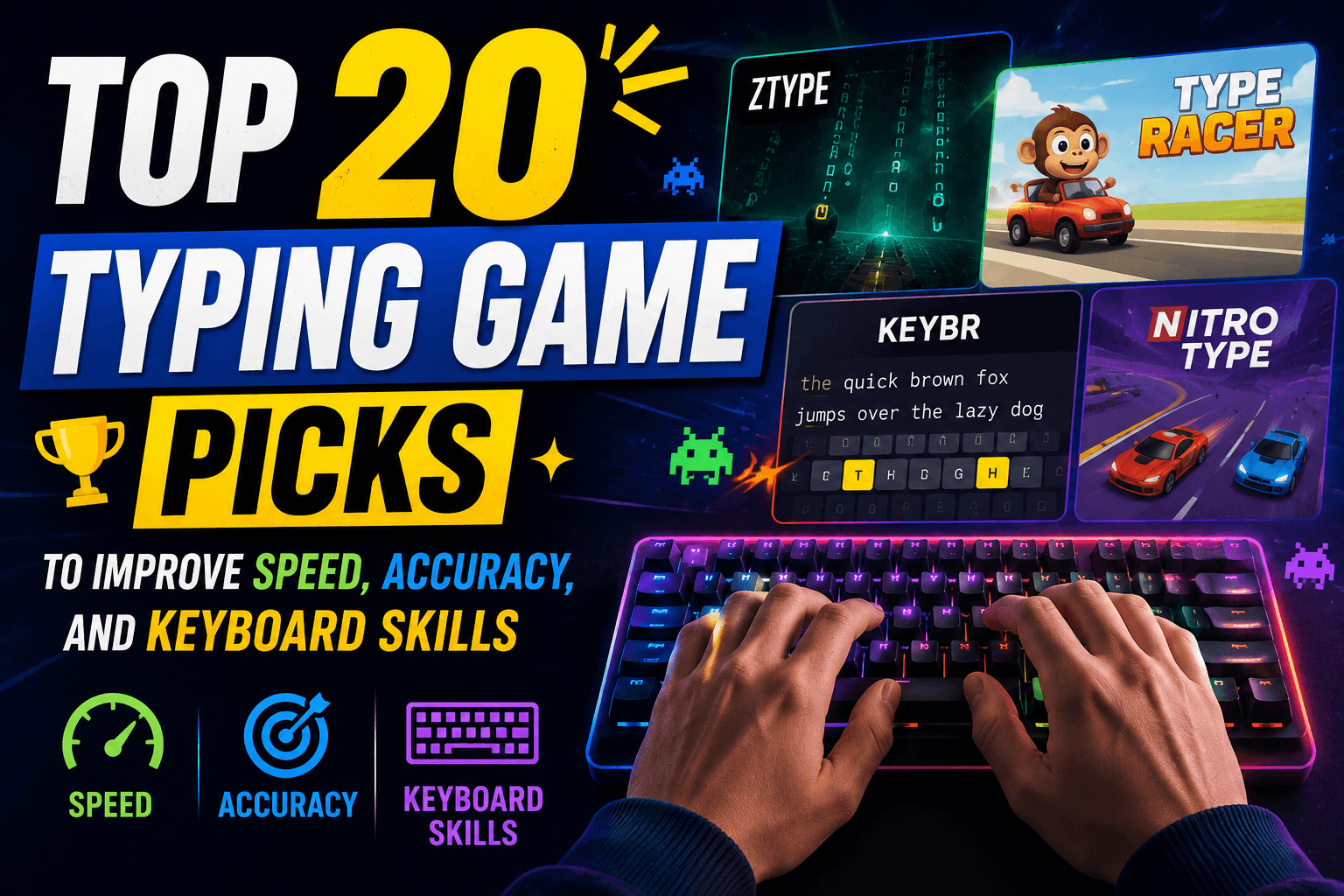
This guide covers the top 20 typing game options for different types of users. Some are best for kids. Some are better for adults. Some are simple browser games. Some are full PC games with story, art, combat, and adventure. Some focus on raw typing speed, while others help with accuracy, reaction time, keyboard memory, and confidence.
The goal is simple: help readers find the right typing game for their level, device, and purpose.
Quick Comparison Table: Top 20 Typing Game List
| Rank | Typing Game | Best For | Platform | Free or Paid |
|---|---|---|---|---|
| 1 | Nitro Type | Competitive typing races | Browser | Free with optional upgrades |
| 2 | TypeRacer | Real-time typing races | Browser | Free |
| 3 | ZType | Arcade typing practice | Browser / mobile versions | Free |
| 4 | Typing.com Games | Kids, students, beginners | Browser | Free |
| 5 | TypingClub Games | Structured typing practice | Browser | Free and paid plans |
| 6 | Monkeytype | Speed practice and tracking | Browser | Free |
| 7 | Ratatype Ratarace | Simple typing race practice | Browser | Free |
| 8 | The Typing of the Dead: Overkill | Adult gamers and PC players | Steam / PC | Paid |
| 9 | Epistory – Typing Chronicles | Story-driven typing adventure | Steam / PC | Paid |
| 10 | Nanotale – Typing Chronicles | Fantasy typing RPG | Steam / PC | Paid |
| 11 | Typefighters | Multiplayer typing battles | Steam / PC | Paid |
| 12 | Qwerty Quest | RPG-style typing battles | Steam / PC | Paid |
| 13 | God of Word | Word and typing challenge fans | Steam / PC | Paid |
| 14 | Secret of Qwerty | Retro RPG typing combat | PC / itch.io | Free or donation-based |
| 15 | Typing Attack | Space shooting typing practice | Browser | Free |
| 16 | KeyTower | Keyboard accuracy and timing | Browser | Free |
| 17 | Guitar Type | Rhythm-style keyboard practice | Browser | Free |
| 18 | Dance Mat Typing | Young children and beginners | Browser | Free |
| 19 | Keyboard Ninja | Kids and basic key recognition | Browser | Free |
| 20 | Poki Typing Games | Casual browser typing games | Browser | Free |
How We Chose These Typing Games
Not every typing game deserves a place on a top list. Some games look fun but do not help much with real keyboard skill. Others are useful but too dull for regular practice. This list focuses on games that offer a practical mix of learning value, entertainment, accessibility, and repeat use.
The ranking considers several points:
• Does the game help with speed, accuracy, or keyboard familiarity?
• Is it easy to access for USA-based users?
• Can beginners understand it quickly?
• Does it offer enough challenge for repeated practice?
• Is it useful for kids, students, adults, or gamers?
• Does the game work well as a learning tool, not just a distraction?
• Is the typing mechanic central to the gameplay?
Some entries are full games. Some are browser-based training platforms with game modes. That is intentional. A parent looking for typing games for kids may need something different from an adult who wants an intense PC typing game. A student may want free online practice, while a gamer may prefer a story-based typing adventure.
Top 20 Typing Game Options
1. Nitro Type
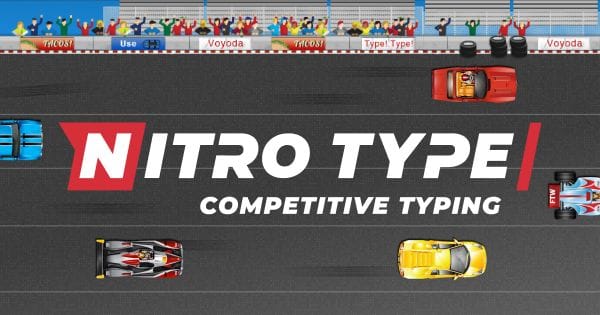
Nitro Type is one of the most popular typing race games online. It turns typing practice into a car race, where players compete by typing words quickly and accurately. The faster you type, the faster your car moves. This simple idea works well because it gives immediate feedback. Every correct word feels like progress.
Nitro Type is especially strong for students, classrooms, and competitive learners. It does not feel like a normal keyboard lesson. It feels more like a racing game with typing built into the engine. Players can race against others, improve their speed, unlock cars, and track progress over time.
For USA visitors searching for a free typing game, Nitro Type is usually one of the safest recommendations because it is easy to start, visually engaging, and suitable for a wide age range. It works well for middle school students, high school students, and adults who want quick typing practice without installing software.
Best for: Competitive learners, students, typing races
Skill focus: Speed, accuracy, consistency
Why it stands out: It makes typing feel like a live competition
2. TypeRacer
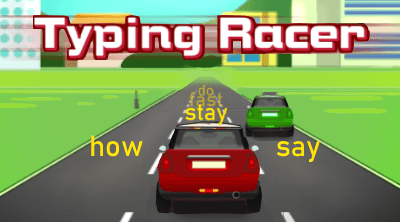
TypeRacer is another classic typing race game, but it has a different feel from Nitro Type. Instead of a more game-like racing environment, TypeRacer focuses on typing passages against real players. The challenge is simple: type the text accurately and finish before your opponents.
This game is useful because it trains typing under pressure. Many people type well during relaxed practice but make mistakes when they feel rushed. TypeRacer helps with that. It encourages speed, but it also punishes sloppy typing because accuracy matters.
TypeRacer is a strong choice for students, office workers, writers, and anyone who wants a quick typing challenge. It is also useful for people who want a more text-focused experience rather than a flashy game interface.
Best for: Real-time typing races
Skill focus: Speed under pressure, accuracy, reading while typing
Why it stands out: It has a simple competitive format that still works
3. ZType
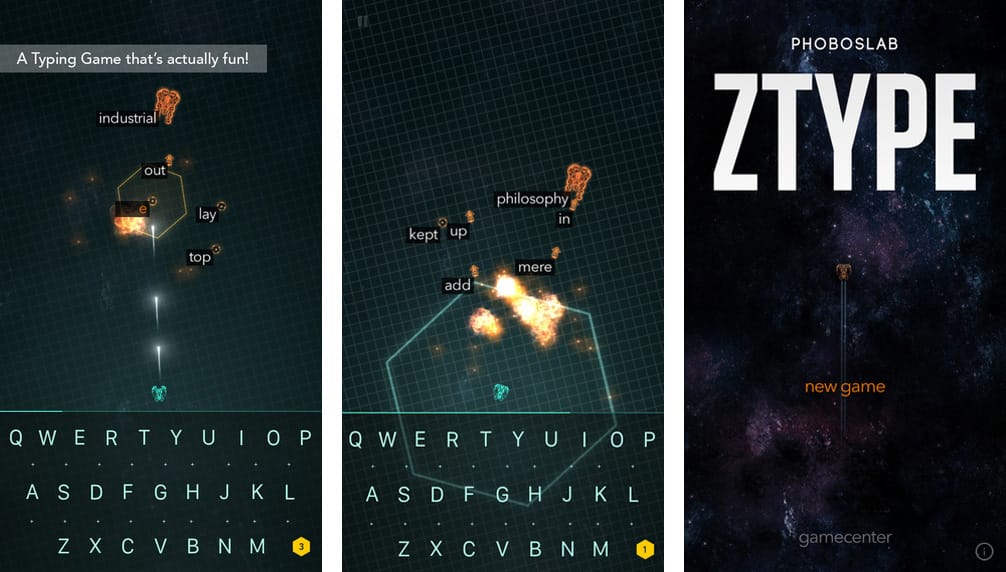
ZType is one of the best arcade-style typing games. The concept is easy to understand. Enemy ships move toward you, and each ship has a word attached to it. To destroy the ship, you type the word correctly. If you are too slow, the enemies get closer.
This game works because it connects typing with survival. You cannot just type casually. You have to read, react, and type with control. That makes ZType useful for improving focus, word recognition, and typing speed.
ZType is also more exciting than many basic keyboarding games. It feels like a space shooter, but the keyboard is the weapon. For learners who get bored with standard typing drills, ZType can be a better way to build daily practice habits.
Best for: Arcade fans and quick practice sessions
Skill focus: Reaction time, word typing, accuracy
Why it stands out: It turns typing into a space-shooter challenge
4. Typing.com Games
Typing.com is widely used for typing lessons, but its games section also deserves attention. The games are designed to help users improve typing speed and accuracy while doing something more entertaining than a plain lesson.
The main advantage of Typing.com Games is that it works for a broad audience. Kids can use it. Adults can use it. Teachers can use it. Beginners can start without feeling lost. The games are built around keyboarding practice, so they are useful for actual skill improvement.
For parents and teachers in the USA, this is one of the easiest recommendations because it combines lessons, tests, and games in one place. It is not just entertainment. It is structured practice with a playful layer.
Best for: Kids, students, teachers, beginners
Skill focus: Typing basics, WPM, accuracy
Why it stands out: It combines learning structure with typing games
5. TypingClub Games
TypingClub is another strong typing platform with a more structured learning path. It includes lessons, videos, tests, and typing games. For learners who need step-by-step guidance, TypingClub can be more useful than random browser games.
The game-based elements help keep practice from feeling repetitive. Students can move through lessons while still getting small rewards, visual feedback, and interactive practice. This makes it a solid option for schools, homeschool families, and beginners who need proper finger placement.
TypingClub is not only about playing games. It is about learning to type correctly and then reinforcing that skill with interactive activities. That makes it a strong choice for people who want long-term improvement instead of quick entertainment only.
Best for: Structured typing education
Skill focus: Touch typing, keyboard memory, accuracy
Why it stands out: It is organized like a real typing course
6. Monkeytype
Monkeytype is not a traditional game in the same way as Nitro Type or ZType, but it deserves a place on this list because it is one of the best tools for people who enjoy typing speed challenges. It has a clean interface, customization options, and useful tracking for people who want to improve WPM.
For serious typists, Monkeytype can become addictive. Users can test themselves with different word counts, time limits, languages, themes, and settings. It feels less childish than many typing games, which makes it a good choice for adults, writers, programmers, and keyboard enthusiasts.
Monkeytype is best for people who already know the basics and want to improve speed, rhythm, and consistency. It is not the best first typing game for young kids, but it is excellent for people who like measurable progress.
Best for: Adults, writers, programmers, keyboard fans
Skill focus: WPM, accuracy, consistency
Why it stands out: It gives clean, fast typing practice without clutter
7. Ratatype Ratarace
Ratarace is a simple and useful typing race game from Ratatype. It focuses on real-time racing by typing words quickly and accurately. It does not need a complicated explanation. You type well, your racer moves faster.
This game works well for students and beginners because it has a friendly structure. It is not as visually intense as some arcade games, but that can be a good thing. The focus stays on the keyboard, the words, and the race.
Ratatype also offers typing lessons and typing tests, so Ratarace fits nicely into a broader learning routine. A user can learn, practice, test, and then play.
Best for: Students and beginner-friendly racing
Skill focus: Speed, accuracy, confidence
Why it stands out: It is simple, clean, and easy to start
8. The Typing of the Dead: Overkill
The Typing of the Dead: Overkill is one of the most famous typing games for adults and PC gamers. Instead of shooting zombies with a gun, players defeat enemies by typing words and phrases. The result is strange, funny, violent, and memorable.
This is not the best typing game for young children. It is better for older teens and adults who want a full game experience rather than a classroom typing tool. The game mixes horror, comedy, and typing mechanics in a way that still feels unique.
For people who think typing games are boring, The Typing of the Dead: Overkill is a strong counterargument. It proves that typing can be part of a real action game, not just an educational exercise.
Best for: Adult gamers and horror-comedy fans
Skill focus: Fast word recognition, pressure typing, accuracy
Why it stands out: It turns a zombie shooter into a typing challenge
9. Epistory – Typing Chronicles
Epistory – Typing Chronicles is one of the most beautiful typing games available. It is an action-adventure game set in a paper-inspired world, where typing is used for combat and interaction. The player explores, fights, solves, and progresses through words.
This game is ideal for players who want more than quick drills. It has atmosphere, story, art direction, and a real sense of adventure. Typing becomes part of the world rather than a separate practice tool.
Epistory is a good choice for older kids, teens, adults, and gamers who enjoy indie games. It can help improve typing, but its biggest strength is immersion. It makes typing feel magical instead of mechanical.
Best for: Story-driven players and indie game fans
Skill focus: Typing accuracy, word recognition, keyboard confidence
Why it stands out: It blends typing with adventure and exploration
10. Nanotale – Typing Chronicles
Nanotale – Typing Chronicles is the spiritual successor to Epistory. It keeps the typing-adventure idea but moves into a colorful fantasy RPG setting. Players explore a world of magic, nature, mystery, and words.
Nanotale is slower and more atmospheric than many competitive typing games. That makes it a better choice for players who want a relaxed but meaningful typing experience. It is less about beating someone else and more about moving through a world using language.
For readers searching for a typing game that feels like a real adventure, Nanotale is worth considering. It is not only typing practice. It is a fantasy game where typing becomes the main way to interact with the environment.
Best for: Fantasy RPG fans
Skill focus: Accuracy, exploration typing, steady practice
Why it stands out: It turns typing into a magical world mechanic
11. Typefighters
Typefighters is a competitive multiplayer typing battle game. Two players face each other using typing skills, but the game is not only about raw speed. It also includes reaction time, attention, tactics, and different modes.
This makes Typefighters more intense than a basic typing test. It is a good option for players who want direct keyboard competition but prefer battles over racing. The game gives typing a fighting-game style structure.
Typefighters is best for people who already have some typing confidence. Complete beginners may find it stressful at first, but intermediate and advanced typists can use it as a sharp competitive challenge.
Best for: Competitive PC players
Skill focus: Speed, reaction time, tactics, accuracy
Why it stands out: It makes typing feel like a multiplayer battle
12. Qwerty Quest
Qwerty Quest is a typing battle game with RPG-style ideas. Players choose difficulty levels, face enemies, and progress by typing. The game uses keyboard skill as the main combat system.
This is a good choice for people who like fantasy settings but want something more direct than a long adventure game. It can also work well for families or older kids because the idea is easy to understand: type correctly to win battles.
Qwerty Quest is useful because it adjusts challenge through difficulty. That helps different users find a pace that fits their current typing ability.
Best for: RPG typing battles
Skill focus: Accuracy, speed, difficulty progression
Why it stands out: It mixes typing practice with fantasy combat
13. God of Word
God of Word combines word-game ideas with typing-style challenges and a Greek mythology setting. It is not a pure keyboarding tutor, but it can still appeal to people who enjoy vocabulary, word puzzles, and typing-based gameplay.
This game is better for players who like language games rather than simple WPM practice. It gives typing a theatrical and mythological theme, which helps it feel different from standard browser typing games.
God of Word may not be the first choice for young beginners who need home-row practice, but it can be a good pick for adults and older students who enjoy word challenges.
Best for: Word-game fans
Skill focus: Vocabulary, typing, language awareness
Why it stands out: It adds a mythology theme to word and typing play
14. Secret of Qwerty
Secret of Qwerty is a retro-style typing RPG inspired by classic typing combat and old-school adventure games. Players battle enemies by typing words, level up, and move through a fantasy-style quest.
The game has a handmade indie feel, which may appeal to players who enjoy smaller PC games. It is not as polished as some commercial titles, but it has charm and a clear typing-based combat system.
Secret of Qwerty is a good reminder that typing games do not need to look like school software. They can also feel like retro RPGs with a keyboard twist.
Best for: Retro game fans
Skill focus: Typing during combat, word recognition, keyboard speed
Why it stands out: It mixes old-school RPG design with typing battles
15. Typing Attack
Typing Attack is a space-themed browser typing game where players destroy approaching ships by typing words. It is similar in spirit to ZType, but it has its own educational-game style.
This game is useful for learners who want quick practice without setting up an account or downloading software. The rules are simple, and the pressure increases as enemies approach. That makes it good for short typing sessions.
Typing Attack can help players improve reaction time and typing accuracy because mistakes slow everything down. It is especially useful for students who need something more exciting than a normal typing drill.
Best for: Quick arcade typing practice
Skill focus: Speed, accuracy, reaction time
Why it stands out: It is simple, free, and easy to play in a browser
16. KeyTower
KeyTower is a typing game where players stack crates or blocks by pressing the correct keys. The goal is not only to type quickly but also to time your keystrokes accurately.
This game is helpful for early learners because it trains key recognition without overwhelming them with long words. Instead of typing full paragraphs, players focus on letters or short sequences. That makes it useful for people still building keyboard familiarity.
KeyTower is not the most advanced typing game on the list, but it has a clear purpose. It helps players connect keys with visual action.
Best for: Beginners and key recognition
Skill focus: Letter location, timing, keyboard familiarity
Why it stands out: It teaches accuracy through simple stacking gameplay
17. Guitar Type
Guitar Type is a rhythm-style typing game where players press keys in time with music. It is a good option for people who enjoy music games and want a different kind of typing challenge.
This game does not feel like a standard typing test. It feels closer to a rhythm game, where timing matters as much as key recognition. That can help learners develop keyboard confidence in a fun way.
Guitar Type works best as a secondary practice game. It may not replace structured typing lessons, but it can make keyboard practice feel more energetic and playful.
Best for: Music and rhythm game fans
Skill focus: Timing, key recognition, rhythm
Why it stands out: It turns typing into a music-style challenge
18. Dance Mat Typing
Dance Mat Typing is one of the most recognizable typing games for young learners. It uses colorful characters, guided lessons, and a child-friendly style to introduce basic typing skills.
This is a strong choice for kids who are just starting. It teaches keyboard layout gradually and keeps the tone light. The visuals and voices may feel too childish for adults, but for elementary-age learners, that can be part of the appeal.
Parents looking for a free typing game for kids should consider Dance Mat Typing because it focuses on fundamentals. It is not about racing or combat. It is about learning the keyboard in a friendly way.
Best for: Young children and beginners
Skill focus: Home row, finger placement, basic typing habits
Why it stands out: It is friendly, simple, and designed for early learners
19. Keyboard Ninja
Keyboard Ninja is a basic typing game that helps with letter recognition and keyboard practice. It is often used by younger learners because the gameplay is simple and visual.
This type of game is useful at the start of the typing journey. Not every beginner is ready for full words, racing, or timed paragraphs. Some learners need to recognize letters first and build confidence pressing the right keys.
Keyboard Ninja is best as an entry-level typing game. It is not meant for advanced typists, but it can help younger users get comfortable with the keyboard.
Best for: Kids and early beginners
Skill focus: Letter recognition, keyboard confidence
Why it stands out: It keeps typing practice simple and visual
20. Poki Typing Games
Poki offers a collection of casual typing games that can be played directly in the browser. This makes it useful for quick practice and casual entertainment. The platform is not only focused on typing, but its typing game section can help users find simple keyboard-based games without much setup.
Poki typing games are best for casual players. They may not offer the same structured learning path as Typing.com or TypingClub, but they are easy to access and can be useful for short practice sessions.
For readers who want free online typing games without installing anything, Poki can be a convenient option.
Best for: Casual browser play
Skill focus: Basic typing, speed, light practice
Why it stands out: It offers easy access to simple typing games
Best Typing Games by Category
Best Free Typing Games
| Game | Why It Is a Good Free Pick |
| Nitro Type | Competitive and easy to start |
| TypeRacer | Real-time races against other players |
| ZType | Arcade-style typing practice |
| Typing.com Games | Good for students and classrooms |
| TypingClub Games | Structured typing practice |
| Ratatype Ratarace | Simple race format |
| Typing Attack | Fast browser arcade practice |
Free typing games are best for beginners, students, and casual users. They are also useful for parents and teachers who do not want to pay before testing what works.
Best Typing Games for Kids
| Game | Why Kids May Like It |
| Dance Mat Typing | Colorful, guided, beginner-friendly |
| Typing.com Games | Clear lessons and playful games |
| TypingClub Games | Structured learning path |
| Keyboard Ninja | Simple letter recognition |
| KeyTower | Easy visual feedback |
| Nitro Type | Racing format keeps practice fun |
For kids, the best typing game is not always the hardest one. It should be easy to understand, visually friendly, and forgiving enough to keep them practicing.
Best Typing Games for Adults
| Game | Why Adults May Prefer It |
| Monkeytype | Clean, fast, serious practice |
| TypeRacer | Competitive but simple |
| The Typing of the Dead: Overkill | Full PC gaming experience |
| Epistory | Artistic adventure game |
| Nanotale | Fantasy RPG typing experience |
| Typefighters | Competitive multiplayer typing battles |
Adults usually need typing games that do not feel too childish. Clean interfaces, real competition, and full game experiences usually work better.
Best Typing Games for Classrooms
| Game | Classroom Benefit |
| Typing.com Games | Lesson support and typing practice |
| TypingClub Games | Structured lessons and progress flow |
| Nitro Type | Competitive student engagement |
| Ratatype Ratarace | Simple racing practice |
| Dance Mat Typing | Good for younger students |
Teachers should choose typing games that match student age, device access, and classroom rules. Games with progress tracking and simple controls are usually better for school use.
How to Choose the Right Typing Game
Choosing the right typing game depends on the user’s goal. A third-grade student, a college student, a programmer, and a casual gamer do not need the same practice experience.
If the goal is to teach a child where the keys are, start with Dance Mat Typing, Keyboard Ninja, Typing.com, or TypingClub. These options are more forgiving and better for basic keyboard habits.
If the goal is to improve speed, use Nitro Type, TypeRacer, Monkeytype, or Ratatype Ratarace. These games make speed measurable and competitive.
If the goal is to make typing feel like a real video game, choose Epistory, Nanotale, The Typing of the Dead: Overkill, Typefighters, Qwerty Quest, or Secret of Qwerty.
If the goal is quick casual practice, ZType, Typing Attack, KeyTower, Guitar Type, or Poki typing games are easy options.
A good rule is simple: beginners need structure, intermediate users need repetition, and advanced typists need challenge.
Benefits of Playing Typing Games
Typing games can help users improve several practical skills at once. The most obvious benefit is speed, but speed is not the only thing that matters.
Good typing games may help with:
• Faster words per minute
• Better typing accuracy
• Stronger finger memory
• Improved keyboard confidence
• Quicker reaction time
• Better focus under pressure
• Less fear of long writing tasks
• More comfortable computer use
• Better school and workplace productivity
The biggest benefit is consistency. Many people quit typing practice because it feels boring. Games make it easier to return the next day.
Tips to Improve Faster with Typing Games
Playing typing games randomly can help, but a smarter routine works better. The goal is not only to win the game. The goal is to build a typing habit that transfers to real writing, schoolwork, emails, coding, or office tasks.
Use these simple tips:
• Practice 10–15 minutes a day instead of one long session once a week.
• Focus on accuracy before speed.
• Keep your fingers near the home row.
• Avoid looking down at the keyboard too often.
• Use the same keyboard position every session.
• Track WPM, but do not obsess over one bad score.
• Try both games and normal typing tests.
• Rest your hands if you feel strain.
• Use games as practice, not as a complete replacement for lessons.
Typing is a physical skill. It improves through repetition, rhythm, and correction. Games make that process easier, but they still require regular practice.
Common Mistakes Beginners Make
Many beginners try to type fast too early. That usually creates more errors. A high WPM score does not mean much if accuracy is poor. It is better to type slowly and correctly at first, then increase speed naturally.
Another common mistake is using only two fingers. Some people can type quickly this way, but it usually limits long-term improvement. Learning proper finger placement may feel slower at first, but it pays off later.
A third mistake is jumping between too many games without building a routine. Trying different games is useful, but improvement comes from steady practice. Pick one main tool and one fun game, then use them consistently.
Finally, many users ignore posture. Bad wrist angle, poor chair height, and tense shoulders can make typing uncomfortable. A good setup helps typing feel smoother.
🔥 Related Posts
20 Best Games to Play in School 2026: Unblocked Browser Hits for Chromebooks & Quick Breaks
Top 20 Offline Mobile Games That Don’t Require Internet (2025 Edition)

Family Game Night Ideas for 2026: Easy, Free, and Inclusive Fun for Busy US Families

Best Upcoming Mobile Games in 2025 You Should Pre-Register For
Coolmath Games Free Online Math Games 2026: Still the Best Brain-Training Spot?