Getting lost in Project Zomboid is not always a bad thing. Some of the game’s best moments happen when a simple supply run turns into a desperate drive through an unfamiliar town with almost no fuel left.
Still, there are times when knowing the Project Zomboid map makes survival much easier.
Maybe you are looking for a gas station before your generator runs dry. Maybe you need a police station, warehouse, hardware store, or quieter place to build a base. Or perhaps you simply want to understand how towns such as Muldraugh, Riverside, Rosewood, West Point, and Louisville connect.
That is where the map becomes useful.
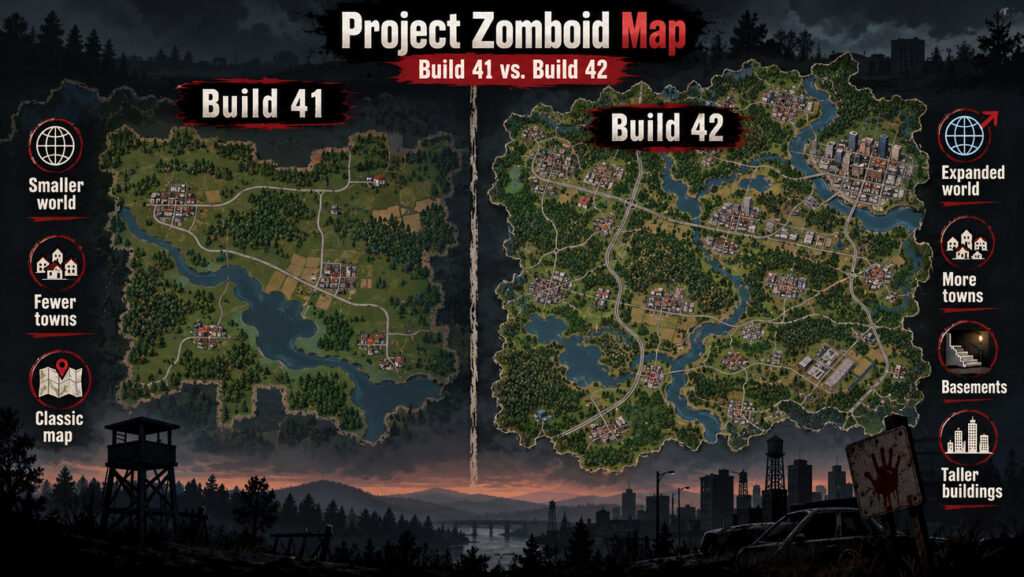
The current Project Zomboid world is considerably larger than the map many returning players remember. Build 42 expanded and reworked Knox Country, adding new areas while redesigning several existing towns. The developers say the map’s surface area has roughly doubled compared with Build 41.
For official game information, updates, and development news, visit the official Project Zomboid website.
The Project Zomboid Map Has Changed a Lot in Build 42
Older map guides can still be useful, but they are no longer the whole story.
Build 42 brought a major expansion of Knox Country. The Indie Stone says Riverside, West Point, Rosewood, Fallas Lake, Muldraugh, Ekron, and Dixie received significant redesign work. The update also expanded the world with locations including Irvington and Brandenburg, while adding many smaller destinations and landmarks throughout the countryside.
The map is not only wider now. It is also more vertical.
Build 42 introduced basements and much taller structures. In Louisville, some buildings can reach dozens of floors, while underground spaces can include basements, bunkers, panic rooms, and other hidden areas.
That means a modern PZ map needs to do more than show roads between towns. Players may also need to think about building interiors, underground spaces, vertical escape routes, and new areas that simply did not exist in older builds.
Official Project Zomboid Interactive Map
The easiest way to study Knox Country outside the game is the official map project.
The developers announced a major upgrade to the official Project Zomboid Map Project in 2026. It now supports Build 41, Build 42, and legacy versions instead of forcing everyone onto one map revision.
You can open the official Project Zomboid interactive map.
This is especially useful because you can zoom from a broad view of Knox Country down to individual streets and buildings.
The updated map project also includes a roleplay-oriented approach that can reduce spoilers. The idea is that you can use as much or as little map knowledge as you want instead of immediately revealing every building interior and point of interest.
That makes it useful for both new players and veterans.
Build 41 Map vs. Build 42 Map
If you are returning after a long break, make sure the map you are using matches your game version.
| Feature | Build 41 | Build 42 |
|---|---|---|
| Overall world size | Smaller | Roughly doubled in surface area |
| Existing towns | Familiar original layouts | Several towns heavily reworked |
| New major areas | More limited | Expanded with additional towns and locations |
| Basements | Very limited | Procedural and unique basements |
| Tall buildings | Lower vertical limits | Much taller structures possible |
| Official map support | Yes | Yes |
| Best choice for current play | Only if playing B41 | Use for current B42 saves |
The official map project lets players switch among supported versions, so you do not have to rely on screenshots from old guides.
Major Locations on the Project Zomboid Map
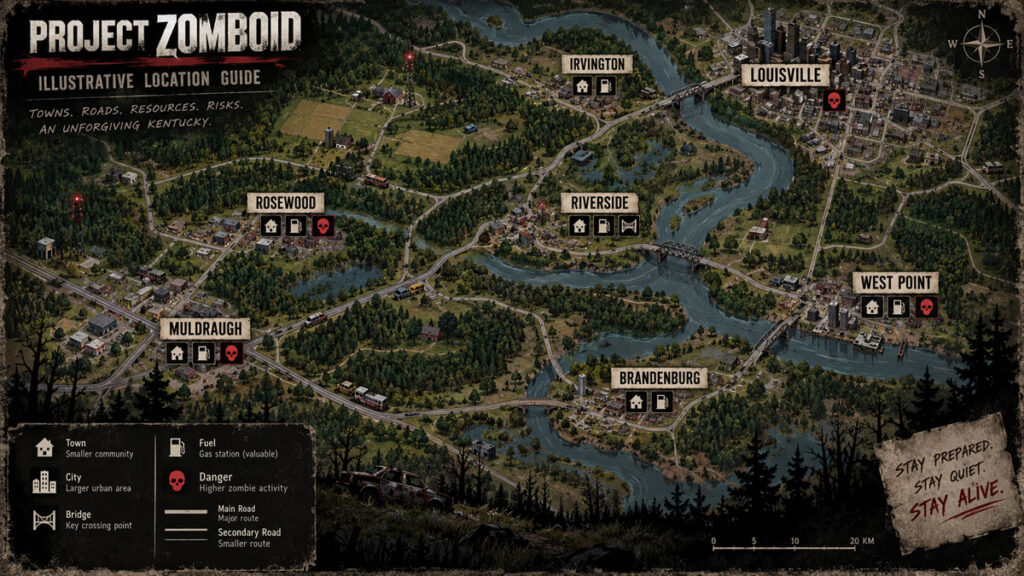
There is no single “best” town. Each place offers a different balance between loot, zombie pressure, road access, and long-term base potential.
| Location | What It Feels Like | Good For |
|---|---|---|
| Muldraugh | Long highway town with commercial areas | New players, warehouses, road access |
| Rosewood | Compact and easier to understand | Early bases, fire station access |
| Riverside | Quieter western town near the river | Safer-feeling starts, residential loot |
| West Point | Busy town with strong road connections | Experienced players, access toward Louisville |
| Louisville | Huge urban area | High-value loot, advanced survival |
| Fallas Lake | Smaller rural settlement | Quiet bases and countryside play |
| Ekron | Rural community with expanded Build 42 detail | Exploring less urban areas |
| Irvington | Build 42 expansion area | New exploration and unfamiliar loot routes |
| Brandenburg | Major Build 42 location | Players wanting fresh territory |
These are broad descriptions rather than guarantees. Zombie populations, sandbox settings, vehicle availability, and your chosen game mode can completely change how safe an area feels.
Muldraugh: A Practical First Town
Muldraugh remains one of the easiest places to understand geographically.
A major road runs through the area, making navigation relatively simple even if you do not constantly check a Project Zomboid interactive map. Commercial buildings, storage areas, houses, and industrial locations provide a useful mix of early-game supplies.
The downside is that the main road can become dangerous quickly.
Moving along quieter residential streets instead of walking directly through commercial zones can make early looting much easier.
Muldraugh is especially useful for players who want to learn how roads connect different parts of Knox Country before attempting longer drives.
Rosewood: Compact and Beginner-Friendly
Rosewood is popular because it is comparatively easy to learn.
Important buildings are not spread across a massive urban area, so new players can develop a mental map quickly. The town’s fire station has also made the area a long-time favorite for players looking for tools, protective clothing, and potential base locations.
The prison outside town is another recognizable landmark, although heading there casually can turn into a very short survival story.
Build 42 reworked Rosewood along with several other established towns, so returning players should not assume every building remains exactly where they remember it.
Riverside: Good for a Slower Start
Riverside sits along the river and generally offers a different atmosphere from more crowded urban areas.
Residential neighborhoods give you plenty of chances to search houses for food, clothing, books, tools, and vehicles. The surrounding countryside also makes it easier to move toward farming or more isolated living later.
Build 42 gave Riverside a substantial visual and structural overhaul, with unique buildings and more consistent landscaping.
If you prefer building a stable base before taking major risks, Riverside can be an appealing starting area.
West Point: Great Location, More Pressure
West Point is valuable largely because of where it sits.
It provides access toward Louisville while still giving you the services and loot of a traditional town. That strategic location also makes it useful for players preparing for longer trips.
The tradeoff is danger.
West Point can become crowded quickly, especially around valuable commercial locations. A survivor who runs through downtown setting off alarms and firing guns may discover just how many zombies were nearby.
For experienced players, that pressure is part of the appeal.
Louisville: The Big Risk, Big Reward Destination
Louisville is where Project Zomboid starts feeling much more like a city survival game.
There are dense streets, large buildings, commercial districts, residential areas, warehouses, medical locations, and countless opportunities to find valuable supplies.
There are also plenty of zombies.
Build 42’s increased vertical limits make Louisville even more interesting because some skyscrapers can now extend to around 32 floors.
Heading into Louisville without a plan is rarely a good idea.
Before entering, it helps to know:
- Where you want to go.
- Which road you will use to escape.
- How much fuel you have.
- Whether your vehicle can handle damaged roads or crowds.
- Where you can stop if the main route becomes blocked.
- Whether the loot you want is actually worth entering a dense area.
A map is most valuable here when it helps you plan an escape, not just a destination.

Build 42 Added More Places Worth Exploring
The current world is not simply the old map with a few extra houses.
The developers describe Build 42 as a major expansion that includes new towns and numerous smaller locations. Examples mentioned in official updates include a Wild West tourist area, a racetrack, a docked steamboat, lakeside properties, an abandoned sanatorium, a boy scout camp, and other unusual destinations.
These places give long-term survivors more reasons to travel instead of settling into one base and repeating the same local supply run.
The edges of the map also include expanded wilderness, which gives players more room to attempt isolated forest survival.
How to Use the PZ Map Without Ruining Exploration
An interactive map can make Project Zomboid much easier, but it can also remove part of what makes exploration exciting.
If this is your first serious playthrough, consider using the map only when you have a specific problem.
For example, looking up the general direction of a nearby town still leaves plenty to discover. Zooming directly into every supermarket, gun store, warehouse, and hidden building before leaving your base turns the game into a checklist.
A useful middle ground is to use the PZ map for roads and town layouts but avoid examining building interiors.
The official map project’s roleplay approach is particularly useful for players who want help navigating without immediately learning every secret in Knox Country.
The In-Game Map Is Still Important
You do not have to keep an external browser map open all the time.
Project Zomboid includes its own player map, and exploration gradually becomes easier as you understand the world. Maps, notes, symbols, and information discovered in the game can help create a more immersive survival experience.
Build 42 also expanded the ways information can reveal locations. The developers have discussed local flyers, advertisements, and other readable material that can point survivors toward useful businesses and locations.
This creates a nice alternative to immediately checking an external map.
Your character can learn about the world while surviving in it.
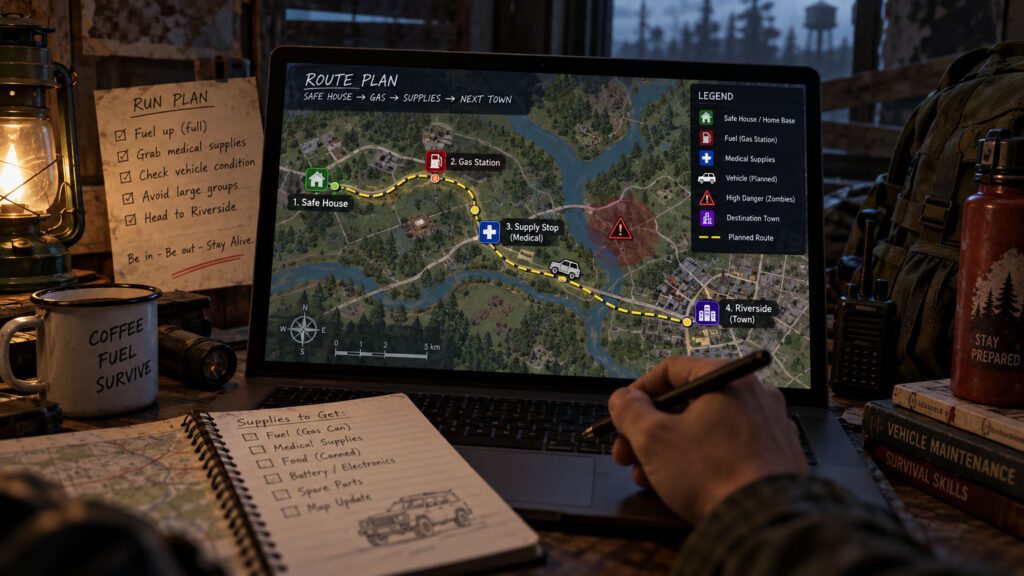
Useful Things to Mark on Your Map
Do not only mark your base.
Useful personal map notes include fuel, working vehicles, generators, medical supplies, blocked roads, large zombie groups, safe houses, and buildings you have already cleared.
A simple map becomes much more valuable after several weeks because it starts recording your particular version of the apocalypse.
A gas station that looked unimportant on day two may become one of your most valuable locations when the power shuts off.
What Does “Mapa Project Zomboid” Mean?
You may occasionally see players search for “mapa Project Zomboid.”
“Mapa” simply means “map” in several languages, including Spanish and Portuguese. Players using that search phrase are generally looking for the same thing as someone searching for a Project Zomboid map or interactive map.
The official map project is still the best starting point because it supports multiple versions of the game and is linked directly from the Project Zomboid website.
Project Zomboid Map FAQ
Is there an official Project Zomboid map?
Yes. The Indie Stone links directly to the official Project Zomboid Map Project from its website. The updated project supports Build 41, Build 42, and legacy maps.
What is the best Project Zomboid interactive map?
For most players, start with the official map project because it is maintained specifically for Project Zomboid and supports current and older versions.
Is the Build 42 map bigger?
Yes. The developers state that Build 42 roughly doubled the map’s surface area compared with Build 41.
Does Build 42 change old towns?
Yes. Riverside, West Point, Rosewood, Fallas Lake, Muldraugh, Ekron, and Dixie were among the areas that received major reworking.
Does the map include Louisville?
Yes. Louisville remains one of the largest and most dangerous urban destinations in the game, and Build 42’s vertical changes allow much taller buildings than before.
Can I use a Build 41 map for Build 42?
It is better to switch the interactive map to the correct version. Build 42 contains substantial changes, expansions, and town redesigns, so relying entirely on a Build 41 layout can send you toward locations that have changed.
Where can I open the official PZ map?
Use the official Project Zomboid Map Project.
Final Thoughts
The Project Zomboid map is useful because Knox Country is large enough that navigation becomes part of survival.
You do not need to memorize every road or inspect every building on an interactive map before starting. In fact, learning the world naturally can be one of the most enjoyable parts of the game.
Use the map when it helps you make a meaningful decision.
Check a road before a long drive. Find a town when you are running low on supplies. Plan an escape route before entering Louisville. Mark fuel, vehicles, safe houses, and dangerous areas as you explore.
And if you are returning from Build 41, make sure you are looking at the current Build 42 version. Knox Country is significantly larger now, several familiar towns have been rebuilt, and there is much more waiting beyond the places older players already know.
For the latest development information, visit the official Project Zomboid website, and for navigation use the official Project Zomboid interactive map.
🔥 Related Posts

Minecraft Schematics: The Complete Guide to Building and Sharing

Free Minecraft: Complete Guide to Play, Download Options, Editions, Trials, Tips & Safe Alternatives

Terraria Calamity – The Ultimate Mod for Hardcore Adventures

Elden Ring Weapons: Best Picks for Every Playstyle

Among Us Unblocked – How to Play Safely Online Anywhere (Full Guide)